

Free site check: a written report on what’s slow or broken
Send us your site address, and within 2 business days we’ll send you a written report: what’s slow or broken, why, and what it takes to fix it. Free, and no call needed.
We look for what costs you calls, bookings or orders: a form that won’t send, a checkout that fails, a page that crawls on a phone.
- Since 2017 building websites for clients
- Over 300 projects since 2017
What does the report cover?
Each finding gets three lines: what’s wrong, why, and the fix.
These are the same checks we run on our own lab stores before we write about a fault.
It doesn’t cover
- A redesign
- A sales call
- Anything you have to sign
We don’t log in or change any settings. On a store we go through checkout as a guest and stop before payment. On forms we open them and note what stops a sender; we don’t send them.
- Speed on a phone
- We run your page through Google’s Lighthouse mobile test and write down how long it takes to show its main content, how heavy the page is, and whether the layout jumps while it loads. Every number comes with the tool and the date.
- Checkout
- On a store, we go through checkout as a guest from an address in each place you say you ship to, and stop before payment. That is how we found the Ohio buyer who could not order, in the store sample below.
- Forms
- We open your contact or booking form on a phone and note anything that stops a visitor from sending it. That is how we found the booking form that did nothing, in the first sample below.
- Errors you can see
- Error messages, plugin conflicts that show on the page, debug notices shoppers can read, and links on the buying path that go nowhere.
- Whether Google is told to skip the page
- A setting carried over from a staging copy can ask search engines to stay away. We check what your live page says.
- How far behind the software is
- Where the site shows its version, we note it. One site we measured on 15 Oct was still on WordPress 5.4.
How slow are business sites on a phone?
On 15 Oct 2026 we measured 10 trade and dental websites in the US, Canada, Australia and New Zealand with Google’s Lighthouse mobile test.
- 10 of 10 took over 4 s to show their main content
- 5.2 s the fastest
- 15.1 s the slowest
- 5.2 s
- 5.5 s
- 6.1 s
- 8.2 s
- 9.9 s
- 10.2 s
- 10.6 s
- 11.1 s
- 12.4 s
- 15.1 s
Two of the ten already had a caching plugin, and one of them still took 10.6 seconds. That’s why the report gives you a measured number and not a checklist.
Slow on a phone? That’s the first thing the free site check measures.
What does one report look like?
Two reports, both from lab sites we built and run ourselves, not a client’s. A booking form first, then a store.
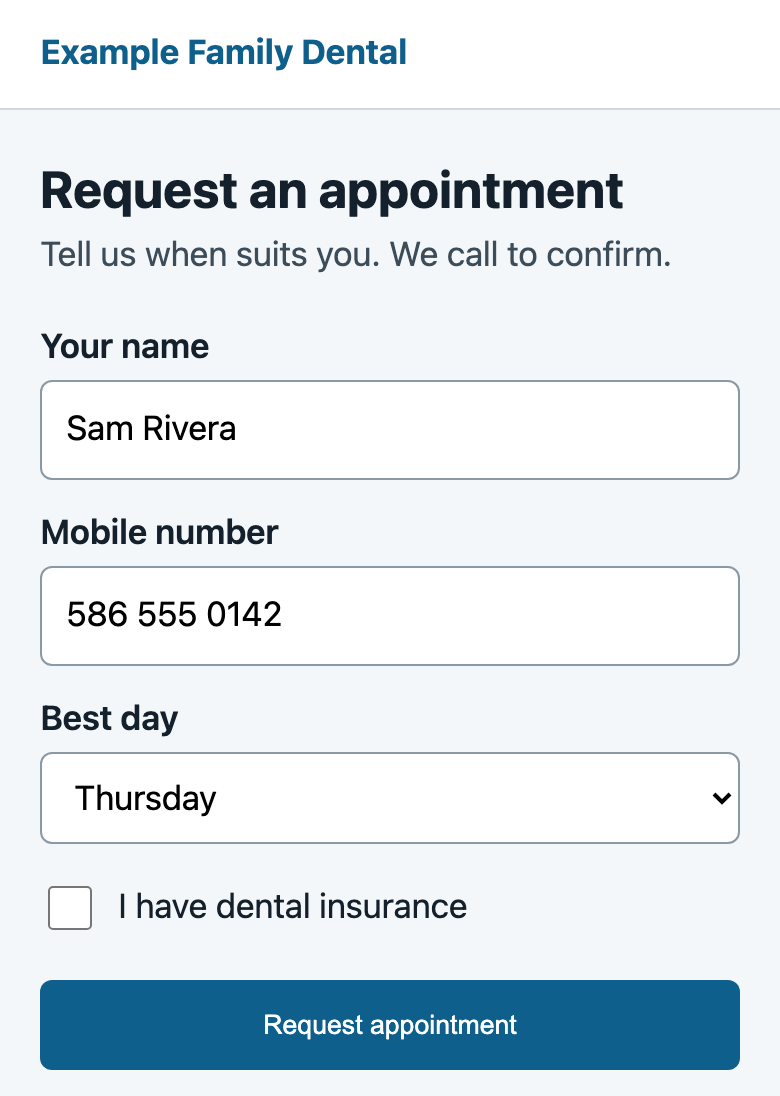
A booking form that does nothing on a phone
- What’s broken
- A patient without insurance taps “Request appointment” and nothing happens. No message appears and no request is sent, so the office never learns a booking was lost.
- Why
- The “Insurance member ID” field is required, but it stays hidden until the “I have dental insurance” box is ticked. The browser blocks the send because it can’t show its “fill in this field” message on a hidden field. Chrome’s console says: “An invalid form control with name=’member_id’ is not focusable.”
- What it takes to fix it
- Make the field required only while it shows. One line of script switches it on when the box is ticked and off when it isn’t. After that change, the same tap sends the request.
Tapped Request appointment. No message, nothing sent.
A store that can’t ship to one state
- What’s broken
- A buyer in Ohio can’t place an order. The cart says “No shipping options were found for Columbus, OH 43215.” No order is created, so nothing under Orders shows a sale was lost.
- Why
- With shipping debug mode on, the cart names the zone the address matched: “Locations not covered by your other zones”. That zone has no shipping method.
- What it takes to fix it
- One rate in that zone. We added a flat rate and order #15 went through. Then check out from an address in each place you ship to.
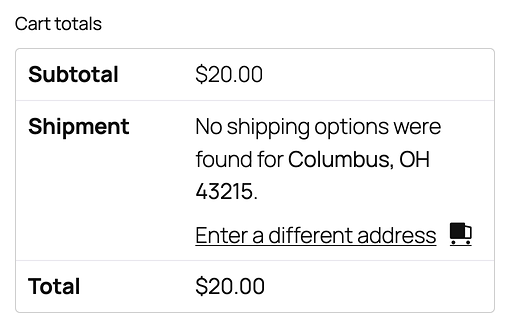
One thing caught us out: on the checkout page, the debug notice first named “Michigan”, the store’s own zone, and showed the right zone only after a reload. That’s why we read it on the classic cart.
The full write-up is in WooCommerce “No shipping options were found”: check which zone matched.
How does the free site check work?
- Send your site address. DM “site check” on LinkedIn or fill in the form. One line on what’s wrong helps, if you know.
- We look at the site. Speed, errors, plugin conflicts that show on the page, checkout and forms. We don’t need a login, so please don’t send passwords.
- You get the written report. Within 2 business days, by email, or as a LinkedIn reply if you sent a DM: what we found, why it happens, and what it takes to fix it.
Who is the free site check for?
You run a business whose website takes orders, bookings or leads, and something feels off. Fewer form fills than last year. A checkout that fails for some buyers. A site that is slow on your own phone.
It also fits if you are about to update or move a site and want a before number to compare against.
It is not for Shopify stores. We don’t offer Shopify work, so the report would not help you much.
Will you try to sell me something?
No sales call, and nothing to sign. The report says what each fix takes, so you, your developer or we can do it. If you want us to do it, reply and we send a quote, and nothing on your site changes before you have that quote.
Who looks at my site?
A person, not a scanner. Mugees Ahmed, DistroCode’s founder, sends every report.
Do you need my login?
No. We don’t log in or change any settings. On a store we go through checkout as a guest and stop before payment. On forms we open them and note what stops a sender; we don’t send them. Please don’t send WordPress or other passwords. If you later hire us for a fix, we ask for a login made just for us.
Which platforms do you check?
WordPress, WooCommerce, Wix, Squarespace and custom web apps, including ones built in Laravel and React. We build and look after sites on every one of them, so the report comes from people who work in that platform.
Do you check sites outside the US?
Yes. The 10 sites we measured on 15 Oct were in the US, Canada, Australia and New Zealand. The report comes in English, within 2 business days.
A written report within 2 business days, free.