
WordPress maintenance and support
Two recent posts on the WordPress.org support forum carried the titles “Upgrade to 7.1.2 Causing Editor Issues” and “WordPress 7.1.2 causing pages to display wrong content with Divi”. One update, two broken sites.
Site down right now? Skip to the fixes
We are DistroCode, a web studio and a US company, building websites since 2017. DistroCode LLC was registered in 2023. We write our own WordPress plugins under the name PluginSprout, and A-1 Courier, a courier and delivery site on WordPress, is on our Work page.
What does a month of care include?
Five things. Updates once a week, on a weekday, tested on a copy first. A daily backup. An uptime watch. A security scan. A short written note at the end of the month.
The plan runs month to month, and you can cancel any time.
A common story in the help requests we read: an update ran, and the site broke. Monthly care is there to catch that on a copy, before your visitors see it.
Updates tested on a copy before the live site
Once a week, on a weekday, we run WordPress, theme and plugin updates on a staging copy of your site first. A staging copy is a private clone that visitors never see.
Then we click through the pages that bring in money or leads. That means the home page and your contact form, and for a store, the cart and the checkout.
If something breaks on the copy, that update does not go to the live site. We hold it back and tell you which plugin, which version, and what broke.
When the copy looks right, we run the same updates on the live site and check the same pages again.
Some updates have to wait on someone else. If a plugin’s author has not caught up with a new WordPress or PHP version, we hold that one plugin back and say why. Everything else still gets updated.
Backups you can restore from
Every day we take a full backup of the files and the database.
We keep each daily backup for 30 days, stored outside your hosting account. If the hosting account has a problem, the backups are not caught in it.
Keep your host’s own backups switched on as well, under your own login. One owner asked the DigitalOcean Community forum for help after their developer disappeared when the site was about 90% done. Backups in your own account stay yours, whatever happens with any developer, us included.
If an update gets past the copy and still breaks the live site, we undo that update first, and restore a backup only if that fails. On a store, we check for orders placed since the backup before restoring it. Then we look for the cause on the staging copy.
An uptime watch and a security scan
The uptime watch checks that your site is answering. If the site stops answering, the watch alerts us.
The security scan checks the site for malware. If it finds something, we tell you what it found and where.
Neither one keeps the site up or cleans it. The host still runs the server, and cleaning up a hacked site is a separate job, quoted after we see the site.
A written note each month on what changed
At the end of each month you get a short note in plain words. It covers five things:
- what we updated, with the old and new version numbers
- what we held back, and why
- the date of the last backup
- anything that needs a decision from you, such as a plugin its author no longer updates
- how long the work took that month
You do not need to read code to follow it. In a recent r/Wordpress post, someone wrote that they were “not a web person” and now in charge of the company site “after the agency that built it left”. The monthly notes are there so whoever comes next starts with a written record of the site.
Something broke today? One-off fixes
Tell us what you see and the page it happens on. A screenshot of the error helps more than a long description.
You do not need a monthly plan for a one-off fix. We take a backup or a staging copy before we touch anything, find the cause, and tell you what we will change before we change it.
These are three problems owners post about. Payment trouble is one of them: an owner on r/Wordpress wrote that their Square plugin kept disconnecting, and that it had become a problem for the business.
Critical error or white screen after an update
“There has been a critical error on this website.” That line, or a blank white page (often called the WordPress white screen of death), means PHP hit an error it could not get past. PHP is the code WordPress runs on.
The usual trigger is a plugin or theme update. A PHP version change at your host can do it too: one recent r/Wordpress thread was titled “contact form 7 (v6.2) crashing sites running php8.2”.
How do you fix a WordPress critical error? Find the exact cause before changing anything. The server’s error log names the file and the line that failed, and that file belongs to a plugin, a theme or WordPress itself.
From there the fix is to roll that one plugin back, update it, or replace it. We try it on a copy first.
What we will not do is switch plugins off one by one on your live site until the error goes away. That hides the cause, and it can quietly break a form or a checkout along the way.
A different message reads “Briefly unavailable for scheduled maintenance. Check back in a minute.” That is WordPress telling visitors an update is running. It uses a file named .maintenance in the site’s main folder, and it ignores that file after 10 minutes (WordPress 7.1.2, wp-includes/load.php, lines 417 to 447, checked October 9, 2026).
So if the site came back half working after that message, an update probably stopped partway. The plugin it was updating needs checking.
WooCommerce checkout not working
A shopper who hits a checkout fault can simply leave without a word, so the store owner may be the last to hear about it.
This is the fix we can show you start to finish, because we did it on our own test store. We broke our own store on purpose to test the fix.
On the DistroCode Staging Store (WordPress 7.1.2, WooCommerce 11.2.0), we switched every payment method off. A canvas tote bag sat in the cart at $24.00.
The checkout said: “There are no payment methods available. Please contact us for help placing your order.” The Place Order button still showed underneath, as if nothing were wrong.
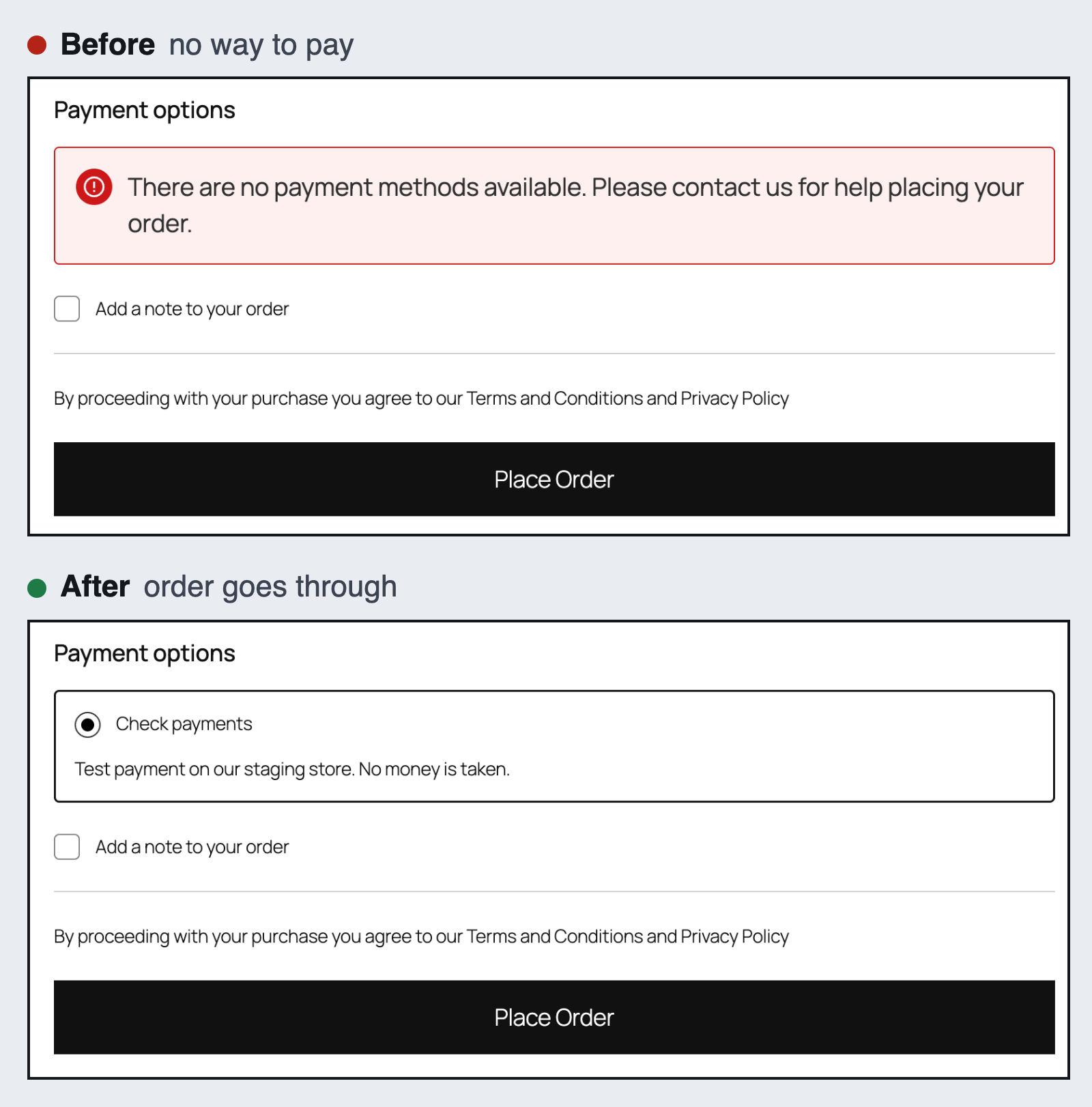
The fix was in WooCommerce, Settings, Payments. We turned Check payments back on, with a line for shoppers saying no money is taken on the test store. Check payments appeared at the checkout, and test order #13 went through for $24.00 on October 9, 2026.
On a real store the same message can have other causes. We find which one it is before we change a single setting.
Owners also post about order emails that stopped arriving, or a payment plugin that fails on some orders. We test those with test orders on a copy, never with your customers’ cards.
We write WooCommerce code ourselves, too. PluginSprout, our plugin line, lists 7 plugins and 1 bundle on pluginsprout.com. Two of them are WC Order Search Pro and Failed & Spam Order Cleaner for WooCommerce.
Slow pages
Why is my WordPress site so slow? The posts we read from site owners, plus one job board listing, show how different the answer can be. One Elementor site was simply slow. One returned a random “too many requests” error. Another timed out. A freelance job post said “every page drags”, with caching and minification plugins already switched on and GTmetrix and PageSpeed Insights still warning about slow pages.
So we do not add another speed plugin and hope. We check, in this order: image sizes, the scripts each plugin loads on the page, the theme or page builder, and the hosting plan.
If you want to speed up a WordPress website, send us the slowest page first.
We start with a measurement, not a promise. We test that page and write down the tool, the date and the numbers.
After the changes, we run the same test on the same page and send you both results. You also get a note on which change made the difference.
We have no before-and-after speed test of our own to show on this page yet. Until we do, we will not quote a speed score we have not measured on your site.
How do we work on a live site?
In four steps. Here is each one, with what it looked like on our own test store.
- Backup or copy first. Before any change we take a full backup or work on a staging copy, and for a live store we recommend staging. The test store needed no backup: it was a WordPress Playground copy (WordPress 7.1.2, PHP 8.3) built from a script, so we could rebuild the broken checkout from scratch at any time.
- Cause before change. We find the root cause and tell you what we plan to change. On the test store the cause was three payment methods switched off: Direct bank transfer, Check payments and Cash on delivery.
- Change, then check. We change one thing and test it the way a customer would. We did not trust the settings screen; we placed test order #13 and watched it reach “Order received”.
- A written note. For the test store the note would say: no payment method was enabled; Check payments is now on, with a description saying no money is taken; switch it off before taking real orders.
The quote gives you a date, once we have seen the site. If your host is slow to restore a backup, the date moves, and we tell you when that happens.
What will we not promise?
A short list, so nobody is surprised later.
And if the budget only covers a guess, we are the wrong fit. We will not change things before we know the cause.
- Uptime. Your host runs the server, so we do not promise the site will never go down. The uptime watch tells us when it does; it cannot stop it. We do not offer 24/7 cover.
- A PageSpeed score. We measure before and after and show you both, with no guaranteed number.
- Search rankings. Maintenance and fixes keep the site working. They do not come with an SEO result.
- Malware or hacked site cleanup in the plan price. The security scan looks for it and we tell you what it found and where. Cleaning up a hacked WordPress site is a separate job, quoted after we see the site.
- A redesign or a rebuild. This service keeps the site you have running. It does not replace it.
- Sites that do not run on WordPress.
Questions owners ask
How much is monthly WordPress maintenance?
It is $99 a month for a WordPress site, or $229 a month for a WooCommerce store. The store plan adds a test order on the checkout after every update.
How do I reach you?
By email at sales@distrocode.com or through the contact form. We reply in writing within one working day, Monday to Friday, so you keep a record of what was said.
How long does maintenance take each month?
It depends on the site. A brochure site needs less checking than a store, because a store’s checkout has to be tested after every update.
We would rather not guess before we have seen it. After the first month, the note tells you how long the work took.
Do you host the site?
No. We look after the site itself. It stays with your host, and we work on it there.
If the host is part of the problem, for example a plan too small for your traffic, we say so. We also tell you exactly what to ask them for.
Moving to a new host is a separate job, covered on our website migration page.
Do you need my admin login?
Yes: admin access to WordPress, or to a staging copy. A separate admin user for us is better than sharing your own password, and you can delete it when the work is done.
For a store, we recommend a staging copy. If a backup ever has to be restored, we may also ask for your hosting login.
What if you cannot fix it?
If a problem looks outside what we can fix, we say so before we start.
If we start and cannot fix it, you still get the written note: what we found, what we tried, and where the cause seems to sit.
If we cannot fix it, you do not pay for that job.
Is something broken right now?
Tell us what happened, the page it happens on, and who hosts the site. Contact us or email sales@distrocode.com, and we will reply with next steps.