Are AI crawlers blocked on your WordPress site? Check robots.txt and the server
In short
Look in two places. robots.txt can ask a crawler such as GPTBot or OAI-SearchBot to stay away, but the page still loads for it. A server rule refuses the request with a 403. In our 18 Oct 2026 WordPress lab, only the server rule changed a status code, and it hid robots.txt from that crawler too.
Seeing this on your own site? Send us the address for a free site check, and a written report comes back within 2 business days.
Key points
- robots.txt is a request. In our lab a Disallow for GPTBot and OAI-SearchBot left every page answering 200 to them.
- A user agent rule in .htaccess is a refusal. GPTBot got 403 Forbidden on the home page while a browser got 200.
- Placed below the WordPress block, that rule missed /sample-page/. Placed above it, every URL we tried gave GPTBot a 403.
- GPTBot and OAI-SearchBot do different jobs. OpenAI says a site that opts out of OAI-SearchBot is not shown in ChatGPT search answers.
On this page (11)
- Are AI crawlers blocked by robots.txt or by the server?
- Which AI crawlers should you know by name?
- How did we test it?
- What does a robots.txt Disallow do?
- What does a server block by user agent do?
- Why did the block miss some pages?
- What happens with both layers on?
- How do you check your own site?
- What did we not test?
- Is a crawler being turned away from your site?
- Questions and answers
Are AI crawlers blocked by robots.txt or by the server?
A WordPress site can have AI crawlers blocked in two places, and they fail in different ways. robots.txt asks a crawler to stay out. A server rule refuses it. Only the first shows up when you open yoursite.com/robots.txt in a browser.
That gap matters because the AI companies split their crawlers by job. A site can sit in Google results and still be closed to ChatGPT’s search crawler because of one line in a file, or one rule nobody remembers adding.
Pages blocked by a robots rule are one of the first things the free check behind our SEO and AI search fixes looks for. Below is what each layer did on a test site, with the status codes.
Which AI crawlers should you know by name?
Each company publishes its crawler names and says what each one is for. We read these pages on 18 Oct 2026:
| Crawler | Company | What the company says it does |
|---|---|---|
| GPTBot | OpenAI | Crawls content that may be used to train its models |
| OAI-SearchBot | OpenAI | Surfaces websites in ChatGPT’s search features |
| ClaudeBot | Anthropic | Collects content that could go into model training |
| Claude-SearchBot | Anthropic | Indexes content to improve search results |
| PerplexityBot | Perplexity | Surfaces and links sites in Perplexity search, not used for training |
| Google-Extended | A robots.txt token only, for Gemini training and grounding |
The split is the point. Blocking GPTBot to keep your pages out of training is one choice. Blocking OAI-SearchBot is another, and OpenAI spells out what it costs: sites opted out of it “will not be shown in ChatGPT search answers, though can still appear as navigational links.”
There are also fetchers that run when a person asks a question, such as ChatGPT-User, Claude-User and Perplexity-User. OpenAI says robots.txt rules “may not apply” to ChatGPT-User. Perplexity says its user fetcher “generally ignores robots.txt rules.”
How did we test it?
On 18 Oct 2026 we ran WordPress 7.1.2 on PHP 8.4.26 and Apache 2.4.68, with MariaDB 11, the default theme and no plugins. We asked for the home page and robots.txt with curl, sending a crawler’s name as the user agent: GPTBot, OAI-SearchBot, ClaudeBot, PerplexityBot and Googlebot, plus a Safari browser string.
With no rules in place, every agent got 200 on both.
One catch came first. With WordPress’s default Plain permalinks, /robots.txt answered 301 to /robots.txt/ with an empty body. After switching to Post name under Settings, Permalinks, it answered 200. Check that yours returns 200, not a redirect.
These were made-up user agent strings, not real crawlers. They test rules that match the agent’s name, and nothing that checks a crawler’s published IP addresses.
What does a robots.txt Disallow do?
It writes a request into a file, and that is all. We added a lab-only plugin on WordPress’s robots_txt filter. robots.txt then printed this:
User-agent: *
Disallow: /wp-admin/
Allow: /wp-admin/admin-ajax.php

Sitemap: http://localhost:9412/wp-sitemap.xml

User-agent: GPTBot
User-agent: OAI-SearchBot
Disallow: /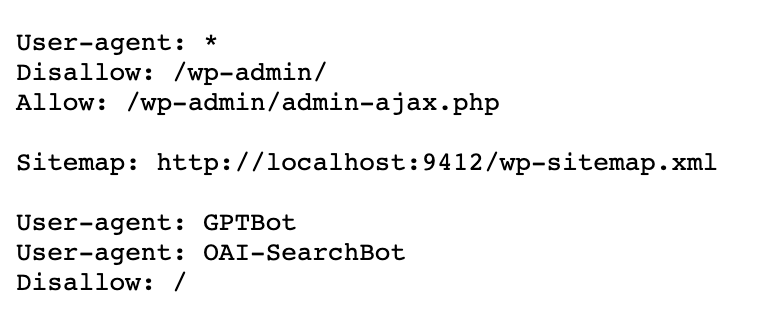
Python’s robots.txt parser read it as we meant: GPTBot and OAI-SearchBot denied, while Googlebot, Google-Extended, ClaudeBot and PerplexityBot were allowed.
The server did not change at all. Every agent, GPTBot included, still got 200 on the home page and on robots.txt. The robots.txt standard, RFC 9309, says its rules “are not a form of access authorization.” Google’s guide puts it plainly: “it’s up to the crawler to obey them.”
In our lab no robots.txt file sat in the web root, so WordPress built it on each request. If yours shows lines you never wrote, look for a real file there and for a plugin with a robots.txt editor. Our post on the Discourage search engines box covers the setting people often blame. In 7.1.2 it added no Disallow line.
What does a server block by user agent do?
It refuses the request outright. We took the robots.txt rule out and put this in .htaccess:
<IfModule mod_rewrite.c>
RewriteEngine On
RewriteCond %{HTTP_USER_AGENT} (GPTBot|OAI-SearchBot) [NC]
RewriteRule .* - [F,L]
</IfModule>
GPTBot and OAI-SearchBot got HTTP/1.1 403 Forbidden and the page “You don’t have permission to access this resource.” ClaudeBot, PerplexityBot, Googlebot and the browser got 200 on the same URL. robots.txt still allowed everyone, so nothing in it hinted at the block.
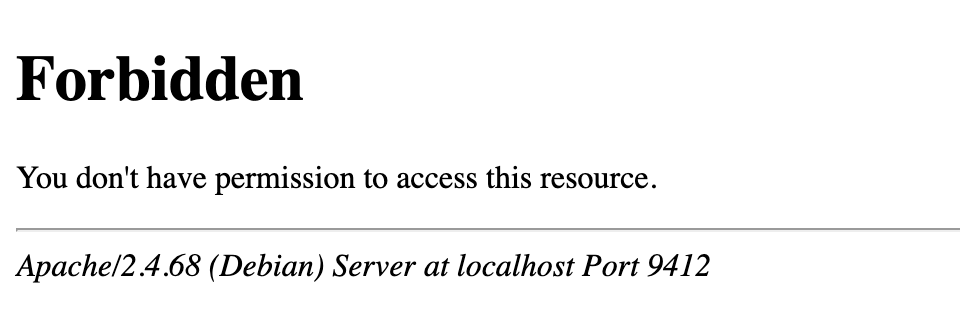
The only other trace was the access log, which showed "GET / HTTP/1.1" 403 against “GPTBot/1.3”. A 403 can come from several layers, and our post on the WordPress 403 Forbidden error walks through the others, from firewall rules to stale login checks.
Finding the layer that turns a crawler away and removing a block you never meant to set is a single $45 fix on a WordPress site, done in 2 days.
Why did the block miss some pages?
Because of where it sat. We first added the rule after the line “# END WordPress”. These are the codes GPTBot and a browser got:
| URL | GPTBot | Browser |
|---|---|---|
| / | 403 | 200 |
| /sample-page/ | 200 | 200 |
| /robots.txt | 200 | 200 |
| /wp-login.php | 403 | 200 |
With pretty permalinks, WordPress’s own rule sends /sample-page/ and /robots.txt to index.php first, so the later rule never ran. A test of the home page alone would have looked like a working block.
We moved the same lines above “# BEGIN WordPress”. Then every URL in the table gave GPTBot a 403, and the browser still got 200. If you test a block, or hunt for one, request a post URL as well as the home page.
What happens with both layers on?
The file that says Disallow ends up behind the 403. With the robots.txt rule and the .htaccess block both in place, GPTBot and OAI-SearchBot got 403 on robots.txt itself, so neither could read the line meant for it.
RFC 9309 says that when robots.txt answers with a 4xx code, a crawler “MAY access any resources on the server.” Anthropic’s page makes the same point from its side: blocking its IP addresses “may not work correctly or persistently guarantee an opt-out, as doing so impedes our ability to read your robots.txt file.” For an opt-out, the vendors point to robots.txt. To be found, both layers have to let the search crawlers through.
How do you check your own site?
- Open yoursite.com/robots.txt. Confirm it loads with no redirect, and look for a group naming a crawler over Disallow: /.
- Run
curl -s -o /dev/null -w "%{http_code}\n" -A "GPTBot/1.3" https://yoursite.com/a-post/, then the same with a browser string. - Repeat for robots.txt. A 403 for the crawler and a 200 for the browser points at a server rule.
- Search .htaccess for HTTP_USER_AGENT, and check your host’s firewall panel for agent rules. Remove what you did not mean, then run step 2 again.
On 18 Oct 2026 our own robots.txt, written by Yoast, held one group: User-agent: * with an empty Disallow, then the sitemap. It names no crawler, so nothing in it turns one away.
What did we not test?
- Real crawler requests, and rules that check a crawler’s IP addresses, such as a CDN, a host firewall or a security plugin.
- Nginx. The .htaccess rule is for Apache only.
- SEO plugins that edit robots.txt.
- What each crawler does after a 403 on robots.txt.
- Whether letting a crawler in gets a site named in AI answers. The AI companies decide that, and nobody can promise it.
Is a crawler being turned away from your site?
Send us your site address and the crawler you are worried about, and we will tell you which layer is saying no.
Want the rest of the site read the way a crawler reads it? Ask for the free site check, and a written reply comes within 2 business days.
Where did these facts come from?
- DistroCode lab, WordPress 7.1.2, PHP 8.4.26, Apache 2.4.68, MariaDB 11 (18 Oct 2026, 12:10 PM ET), status codes by user agent for the home page, a page and robots.txt, with a robots.txt Disallow, an .htaccess user agent block below and above the WordPress rules, and both at once, checked Oct 18, 2026
- OpenAI, Overview of OpenAI crawlers (GPTBot, OAI-SearchBot, ChatGPT-User), checked Oct 18, 2026
- Anthropic, Does Anthropic crawl data from the web, and how can site owners block the crawler? (ClaudeBot, Claude-User, Claude-SearchBot; page dated April 7, 2026), checked Oct 18, 2026
- Perplexity, Perplexity crawlers (PerplexityBot, Perplexity-User), checked Oct 18, 2026
- Google, Google's common crawlers (Google-Extended; last updated 2026-10-15 UTC), checked Oct 18, 2026
- Google Search Central, AI features and your website (supporting links must be indexed and eligible for a snippet), checked Oct 18, 2026
- Google Search Central, Introduction to robots.txt ("it's up to the crawler to obey them"), checked Oct 18, 2026
- RFC 9309, Robots Exclusion Protocol (rules "are not a form of access authorization"; section 2.3.1.3 on a 4xx robots.txt), checked Oct 18, 2026
Questions and answers
How do I allow AI crawlers in robots.txt?
Remove any group that names them over a Disallow line. The robots.txt that WordPress 7.1.2 served in our lab blocked only /wp-admin/ for every agent, so no AI crawler was turned away by it. Then check the server too, because robots.txt cannot show a server rule.
Why is GPTBot blocked when my robots.txt allows it?
Something on the server refuses it, such as a user agent rule in .htaccess or a rule in a firewall. In our lab robots.txt allowed every agent and GPTBot still got 403 Forbidden. Compare status codes for GPTBot and a browser on the same URL.
Does blocking GPTBot keep my site out of ChatGPT search?
OpenAI's bots page says no. GPTBot collects content that may be used to train its models, and OAI-SearchBot surfaces sites in ChatGPT search. OpenAI says each setting is independent of the others.
Does Google-Extended affect Google Search or AI Overviews?
Google says Google-Extended "does not impact a site's inclusion in Google Search". It is a robots.txt token with no user agent of its own. Google's AI features page says a supporting link in AI Overviews must be indexed and eligible to show with a snippet.
Still stuck? Send us the page address and what you see Want to know if the problem stops here? Ask for the free site check.
We write up one real fix or build a few times a week. Follow DistroCode on LinkedIn