“Indexing request rejected” on a WordPress page: find the noindex
In short
Indexing request rejected means Google's live test found the page could not be indexed, so the request never joined the queue. On a WordPress site, look for a noindex first. In our 18 Oct 2026 lab, three switches each set one: the Reading box, Yoast's Advanced setting, and an X-Robots-Tag header the page source never shows.
Seeing this on your own site? Send us the address for a free site check, and a written report comes back within 2 business days.
Key points
- Google's URL Inspection help says you cannot request indexing if the live test finds the page non-indexable.
- Two curl lines found every noindex in our lab. One reads the robots meta tag, the other reads the response headers.
- The Reading box wrote noindex, nofollow on the whole site. Yoast's per-page No wrote noindex, follow on one page only.
- An X-Robots-Tag header in .htaccess said noindex while the page source still said index, follow.
- Clear the switch, run Test live URL, and request indexing once. Repeat requests do not speed it up.
On this page (11)
- What does “indexing request rejected” mean?
- How did we test it?
- Which two commands show a noindex?
- Is “Discourage search engines” still ticked?
- Did Yoast hide just this one page?
- Can a page say index and still be noindex?
- How do you see what Google saw?
- How do you fix it and ask again?
- What did our lab leave out?
- Is Search Console still rejecting your page?
- Questions and answers
What does “indexing request rejected” mean?
Indexing request rejected means Google tested the live page when you clicked Request indexing, and the page failed. Google’s URL Inspection help puts the rule plainly: “You cannot request indexing if the page is considered to be non-indexable in the live test.”
A page passes a quick check first. Only then, Google says, “it will be submitted to the indexing queue.” A rejected request never got that far.
On a WordPress page, the first thing to look for is a noindex. Finding the one switch that tells Google to skip a page, and clearing it, is a single $45 fix in our SEO and AI search fixes.
How did we test it?
Our lab site, set up on 18 Oct 2026, was a plain WordPress 7.1.2 install: PHP 8.4.26, Apache and MariaDB 11 in Docker. Yoast SEO 28.7 came from wordpress.org, and the test page lived at /pricing/.
Then we set three noindex switches, one at a time, and read the page after each one the way a crawler would, without logging in. Each switch was undone before the next.
Our lab is not on the public internet, so Google could not inspect it. This post shows no Search Console screen.
Which two commands show a noindex?
These two, run against the page address:
curl -s https://example.com/pricing/ | grep -i 'name=.robots'
curl -sI https://example.com/pricing/ | grep -i x-robots-tag
The first prints the robots meta tag from the page source. The second prints the X-Robots-Tag response header, if there is one.
With every switch off, our page gave this:
<meta name='robots' content='index, follow, max-image-preview:large, max-snippet:-1, max-video-preview:-1' />The header command printed nothing. That is a page Google is free to index.
Is “Discourage search engines” still ticked?
The first switch covers the whole site. Under Settings, Reading, the last row is Search engine visibility, with the box “Discourage search engines from indexing this site.”
With it ticked, the meta line on our page changed to:
<meta name='robots' content='noindex, nofollow' />No header appeared. Every page on the site gets the same tag. We wrote up what else the box changes, and what it leaves alone, in what the discourage search engines box does.
Did Yoast hide just this one page?
The second switch is per page, which is why it is easy to miss. In the page editor, click the Yoast icon in the toolbar. Advanced is collapsed near the bottom of the sidebar, under Schema and Content blocks.
Inside it, Yoast 28.7 asks “Allow search engines to show this content in search results?” The wording says content, not page. We set it to No.
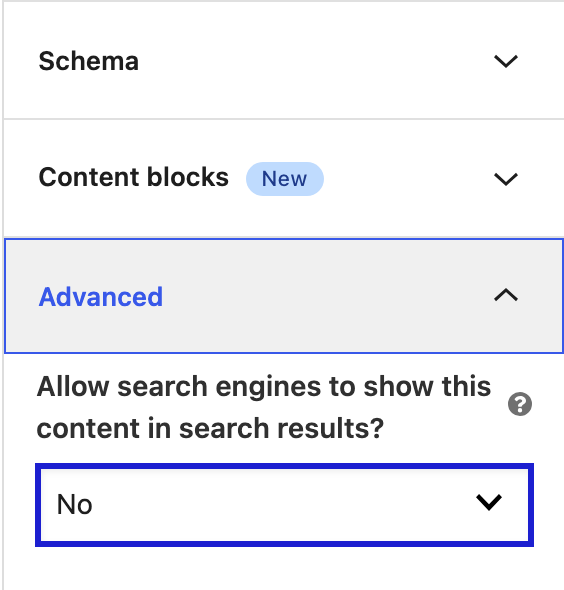
The meta line turned to noindex, follow, and again no header. Our other pages still read index, follow. Only this one page dropped out.
Can a page say index and still be noindex?
Yes. That was our third switch, and the one view-source cannot catch. We added these lines to the top of the site’s .htaccess file:
<IfModule mod_headers.c>
Header set X-Robots-Tag "noindex"
</IfModule>
After that, the meta line still read index, follow, max-image-preview:large and the rest. Yoast had nothing to warn about. The header command told a different story:
X-Robots-Tag: noindexGoogle treats that header as a noindex. Its own guide to blocking indexing shows the same X-Robots-Tag: noindex line as the header way to do it. Its Page indexing help is just as clear: “If you want this page to be indexed, you must remove the tag or HTTP header.”
One thing surprised us. At first the header did not appear at all. The stock WordPress image does not load Apache’s mod_headers module, so the lines inside IfModule were skipped in silence. The header only showed up after we enabled the module and reloaded Apache. A host that has mod_headers on applies it straight away.
When a page comes to us with this message, we run those two curl lines first. The answer shows whether the noindex sits in the page or in the server, before anyone opens a settings screen.
How do you see what Google saw?
Use the URL Inspection tool in Search Console and click Test live URL. Google’s help says the Indexing allowed? line shows why indexing is disallowed when it is.
For the header case, click View crawled page. Google says it shows “HTTP response headers”, and that is where an X-Robots-Tag shows up.
How do you fix it and ask again?
- Run the two curl lines on the rejected page.
- If the meta line says noindex, nofollow on every page, untick the Reading box and save.
- If it says noindex, follow on this page only, open Yoast’s Advanced section on that page and set it back to Yes.
- If the meta line is clean but the header says noindex, look for an X-Robots-Tag line in .htaccess. Keep a copy of the file before you change it.
- Run both lines again. You want index in the meta line and no header.
- In Search Console, run Test live URL, then click Request indexing once.
Google says there is a daily limit on index requests. Its recrawl guide adds that asking again for the same URL “won’t get it crawled any faster.”
What did our lab leave out?
- The real Search Console dialog. Our lab address is not public.
- Nginx, which keeps headers in its server config, not in .htaccess.
- Other SEO plugins, such as Rank Math or All in One SEO, which have their own per-page setting.
- A theme or plugin adding noindex in code, and headers set by a CDN or the host outside WordPress.
- A robots.txt block, which is a different problem with a different Search Console status.
Is Search Console still rejecting your page?
Send us the page address, and we will tell you which of the three switches is on, or what else is stopping it.
Rather have the whole site reviewed? The free site check lists what is wrong in writing, within 2 business days.
Where did these facts come from?
- DistroCode lab, WordPress 7.1.2, PHP 8.4.26 on Apache, MariaDB 11, Yoast SEO 28.7 (18 Oct 2026), three noindex switches each set, read with curl and undone, checked Oct 18, 2026
- Google Search Console Help, URL Inspection tool ("You cannot request indexing if the page is considered to be non-indexable in the live test"), checked Oct 18, 2026
- Google Search Console Help, Page indexing report ("If you want this page to be indexed, you must remove the tag or HTTP header"), checked Oct 18, 2026
- Google Search Central, Block Search indexing with noindex (the X-Robots-Tag noindex header example; last updated 10 Dec 2025), checked Oct 18, 2026
- Google Search Central, Ask Google to recrawl your URLs (the quota, and why repeat requests do not help; last updated 10 Dec 2025), checked Oct 18, 2026
Questions and answers
What does "Indexing request rejected" mean in Search Console?
The page failed Google's quick check when you clicked Request indexing. Google's URL Inspection help says you "cannot request indexing if the page is considered to be non-indexable in the live test." Fix the cause, then test the live URL again.
Why does my page source say index, follow but Google says noindex?
Look at the response headers. In our lab an X-Robots-Tag noindex header, set in .htaccess, left the meta tag at index, follow. Run curl -sI on the page address and search the output for x-robots-tag.
Where is the Yoast noindex setting for one page?
In the page editor, click the Yoast icon in the toolbar, then open Advanced near the bottom of the sidebar. In Yoast 28.7 the question reads "Allow search engines to show this content in search results?" Set it back to Yes.
How many times should I click Request indexing?
Once, after the live test passes. Google says there is a daily limit on index requests, and that asking again for the same URL won't get it crawled any faster.
Still stuck? Send us the page address and what you see Want to know if the problem stops here? Ask for the free site check.
We write up one real fix or build a few times a week. Follow DistroCode on LinkedIn