Hire a WordPress developer to fix an error? Send these 3 things first
In short
Before you hire a WordPress developer to fix an error, send three things: the error line from wp-content/debug.log, the text from Tools, Site Health, Info, "Copy site info to clipboard", and a temporary administrator login you delete afterwards. In our 18 Oct 2026 lab, the log line alone named the broken plugin's file and line 7.
Seeing this on your own site? Send us the address for a free site check, and a written report comes back within 2 business days.
Key points
- The critical error page names no file, no line and no plugin. A developer can't start from it.
- The debug.log line does. Ours read "Call to undefined function lab_missing_function() in .../plugins/lab-broken/lab-broken.php:7".
- Site Health's copied site info was 151 lines in our lab, with no database password, no salts and no email address in it.
- A separate administrator account for the developer, deleted with "Attribute all content to another user", kept every post.
- Never send wp-config.php or your own password. Treat the recovery mode link in the email as a key.
On this page (10)
- What should you send when you hire a WordPress developer to fix an error?
- Why isn’t the critical error screen enough?
- Where do you find the error line?
- Does the “technical issue” email help?
- What does Site Health’s site info hold, and is it safe to send?
- How do you give a developer access without your password?
- What should you never send?
- What did we not test?
- Is your site showing the critical error right now?
- Questions and answers
What should you send when you hire a WordPress developer to fix an error?
If you hire a WordPress developer to fix an error, the first reply you get is often a list of questions. Which error? Which plugin? Which PHP version? Can I get in? Three things answer all of them before they’re asked:
- The error line from wp-content/debug.log, copied whole.
- The text from Tools, Site Health, Info, using the “Copy site info to clipboard” button.
- A temporary Administrator login made just for the developer, which you delete when the job is done.
If WordPress emailed you “Your Site is Experiencing a Technical Issue”, that helps too, with one warning we cover below.
We tested each of these on a broken WordPress 7.1.2 site on 18 Oct 2026. Reading that error line, pausing the plugin it names and checking the site loads again is one of the one-off fixes in our WordPress maintenance work.
Why isn’t the critical error screen enough?
Because it says almost nothing. Our lab site had an active plugin calling a function that doesn’t exist. The home page, the login page and the dashboard all returned HTTP 500 with this text and a help link:
“There has been a critical error on this website.”
No file. No line. No plugin name.

A screenshot of this page tells a developer that PHP stopped. It doesn’t tell them where.
Where do you find the error line?
In wp-content/debug.log, once logging is on. In wp-config.php, above the “That’s all, stop editing” line, these three settings write errors to the log and keep them off the screen:
define( 'WP_DEBUG', true );
define( 'WP_DEBUG_LOG', true );
define( 'WP_DEBUG_DISPLAY', false );
Load the broken page once, then open the log. This is the first line of the entry our lab wrote, word for word:
[18-Oct-2026 14:35:02 UTC] PHP Fatal error: Uncaught Error: Call to undefined function lab_missing_function() in /var/www/html/wp-content/plugins/lab-broken/lab-broken.php:7The folder after /plugins/ is the culprit, and :7 is the line. Send the whole entry, stack trace included. If you can’t edit wp-config.php, your host’s PHP error log usually holds the same line.
Does the “technical issue” email help?
Yes. The one our lab caught named the plugin. Its error details read “An error of type E_ERROR was caused in line 7 of the file”, then the full path to lab-broken.php. It also listed the WordPress version (7.1.2), the active theme, the plugin’s version and the PHP version (8.4.26). That’s most of a developer’s first questions in one email.
Two catches. It holds a recovery mode link, valid for one day. The link alone doesn’t log anyone in (ours opened the login form), but it puts the site in recovery mode for whoever signs in next. Forward the details, not that link. Our post on what the WordPress technical issue email means covers how to use the link yourself.
And it may never come. WordPress sent ours only when the error hit /wp-login.php. Three hits on the home page sent nothing, and it sends at most one a day. When we moved the same broken code into an mu-plugin, the site still showed the critical error but no email went out, because WordPress only sends it for a plugin or a theme. The debug.log line was there both times.
What does Site Health’s site info hold, and is it safe to send?
It holds the technical facts a developer would ask for, and in our lab it held none of the secrets. We clicked “Copy site info to clipboard” while the site was working and saved what it copied. It was 151 lines and 5,752 characters, in sections for WordPress, paths and sizes, the active theme, inactive themes, mu-plugins, plugins, media, server, database, constants and folder write access.
Then we searched it:
| Searched for | Matches |
|---|---|
| The database password | 0 |
| The authentication keys and salts | 0 |
| The admin password | 0 |
| “@”, so any email address | 0 |
The database name, user and host were left out too. What it does show is the server path (/var/www/html), exact versions of PHP, Apache, MariaDB and every plugin, and the debug settings. It also lists inactive plugins by name, which is how a broken plugin showed up in ours.
So it’s fine to send to the person you hired. Don’t paste it into a public forum while the site is still unpatched. If the dashboard won’t load at all, send the debug.log line first and the site info once the site is back up.
How do you give a developer access without your password?
Make them their own Administrator account, then delete it afterwards. In our lab we added a temporary administrator with a separate email address and logged in with it. It landed on the dashboard like any admin.
When the job was done, we opened Users, chose Delete under that account, and WordPress asked what to do with its content. There are two choices.
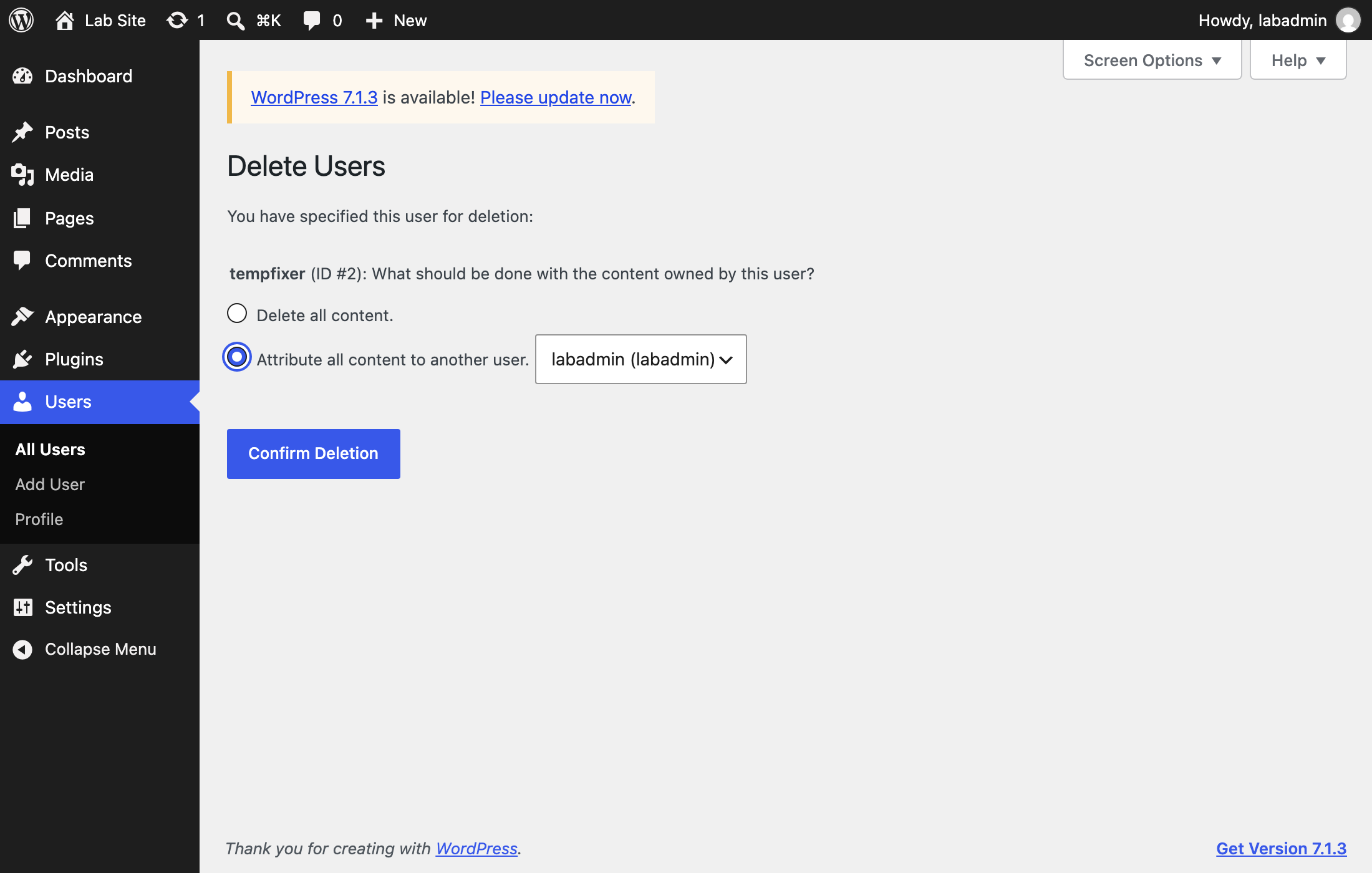
“Delete all content.” removes anything that account made. “Attribute all content to another user.” hands it to you. We picked the second, and the post the temporary account had written moved to our main admin. Nothing was lost.
One case where a login is not enough: a broken mu-plugin. Recovery mode never started for it in our lab, so the fix is to rename or remove the file, which takes SFTP or your host’s file manager.
What should you never send?
- wp-config.php. On a real host it holds the database password and the salts in plain text.
- Your own admin username and password.
- The recovery mode link, to anyone you wouldn’t hand a key to.
What did we not test?
- Real shared hosts, where the recovery email may be blocked or sent from another address.
- Mail delivery. Our lab caught the email in a log and sent nothing.
- Multisite, a theme as the cause, and a plain white screen with no message.
- Site Health on a site with a cache or security plugin, which may add sections.
Is your site showing the critical error right now?
Send us the debug.log line or the technical issue email, without the recovery link, and we’ll tell you which plugin or file it points to.
Want the whole site looked at first? Send your address for the free site check, and a written reply comes within 2 business days.
Where did these facts come from?
- DistroCode lab, WordPress 7.1.2, PHP 8.4.26 on Apache, MariaDB 11.8.9, theme Twenty Twenty-Five (18 Oct 2026), a plugin and an mu-plugin calling an undefined function, the recovery email captured to a log, Site Health's copied site info searched, and a temporary administrator created, used and deleted, checked Oct 18, 2026
- WordPress Advanced Administration, Debugging in WordPress (WP_DEBUG_LOG writes debug.log in the content directory, WP_DEBUG_DISPLAY false hides errors on screen), checked Oct 18, 2026
- WordPress.org, Site Health screen (the Info tab's export copies all the information about the site to the clipboard), checked Oct 18, 2026
- WordPress Code Reference, WP_Recovery_Mode::handle_error() (returns early when the request is not a protected endpoint), checked Oct 18, 2026
- WordPress.org, Users screen (Delete Users, attribute all posts and links to another user), checked Oct 18, 2026
Questions and answers
What information does a WordPress developer need to fix an error?
The exact error line with its file and line number, the WordPress, PHP and theme versions, the list of active plugins, and a way in. The debug.log line covers the first part, Site Health's copied site info covers the versions and plugins, and a temporary administrator account covers access.
Is it safe to send Site Health info to a developer?
In our lab the copied text held no database password, no salts, no admin password and not one "@", so no email address. It does show server paths and exact versions. That is fine for someone you have hired, but don't paste it into a public forum while the site is still broken.
Should I give a developer my WordPress password?
No. Add a separate Administrator account for them under Users, Add User, with their email address. When the work is done, delete it and choose "Attribute all content to another user", so anything they created stays on the site.
Why did I not get the "technical issue" email?
In our lab WordPress sent it only when the error hit the login page or the dashboard, not the home page, and at most once a day. A crash in an mu-plugin sent no email at all. The debug.log line is the dependable record.
Still stuck? Send us the page address and what you see Want to know if the problem stops here? Ask for the free site check.
We write up one real fix or build a few times a week. Follow DistroCode on LinkedIn