Why is my Wix website not showing on Google? 5 checks
In short
A Wix site that Google cannot find is often held back by a switch, not weak SEO. In SEO Settings, "Let search engines index your site" must be on, and it overrides every page. Then check the page switch, inspect the address in Google Search Console, request indexing, and allow time. Google gives no date.
Seeing this on your own site? Send us the address for a free site check, and a written report comes back within 2 business days.
Key points
- In Wix, SEO and GEO, Tools and settings, SEO Settings holds a switch called "Let search engines index your site". Off blocks the whole site.
- The site wide switch overrides the "Let search engines index this page" switch on each page.
- Wix says crawling takes time for every site and gives no number. You can submit the sitemap or pages to Google yourself.
- Google's URL Inspection tool can request indexing, but it has a daily limit and cannot help a page its live test calls non indexable.
- Google's AI Overviews and AI Mode need the page to be indexed and eligible for a snippet, so indexing comes first for AI search too.
On this page (8)
- Why is my Wix website not showing on Google?
- Check 1: is the site wide index switch on?
- Check 2: is the page switch on for the page you cannot find?
- Check 3: does Google have your address?
- Check 4: have you asked Google to index it?
- Check 5: have you given it time?
- What does this mean for AI search?
- Questions and answers
Why is my Wix website not showing on Google?
When a Wix site is not showing on Google, a switch is a likelier cause than weak SEO. Wix has one setting that blocks the whole site and another that blocks a single page, and either one keeps Google out. Run the five checks below in order. Each is free and takes minutes.
We run them first on Wix sites sent to our Wix website help. If all five pass and the site is still missing, the work moves to titles, headings and content, which our SEO and AI search fixes cover.
Check 1: is the site wide index switch on?
In Wix, open SEO and GEO, then Tools and settings, then SEO Settings. Find the switch called “Let search engines index your site”.
If it is off, Wix tells search engines to skip the whole site, so a page with its own switch on is still blocked.
Check 2: is the page switch on for the page you cannot find?
Each page has its own “Let search engines index this page” switch in the Editor. A page with that switch off stays out of Google even when the rest of the site is fine.
If one page is missing and the others show, start here. If the whole site is missing, Check 1 comes first, because it overrides this one.
Check 3: does Google have your address?
Wix says crawling takes time and applies to every site, and it gives no number. It also says you can submit your sitemap or pages to Google yourself.
Open Google Search Console, paste the address of the missing page into the bar at the top and run URL Inspection. It says whether Google has the page, and if not, why. That reason, not a guess, decides what you change.
For a search you can do without an account, type site:yourdomain.com into Google. Zero results means Google has none of the site yet.
Check 4: have you asked Google to index it?
In URL Inspection, click Request indexing. Google’s page says this “typically takes only a day or so, but can take much longer”, and it can take up to a week or two.
Three limits apply:
- There is a daily limit on requests.
- It does not work if the live test says the page cannot be indexed. Fix the switch first.
- It is a request, not a guarantee.
Check 5: have you given it time?
Write down the date you asked, and leave the settings alone until then. Changing a setting every day makes it harder to tell which change worked.
If you restored an older version of the site recently, see what a Wix Site History restore leaves alone. SEO Settings stay as they are now, so check the Check 1 switch rather than assume a restore reset it.
What does this mean for AI search?
Google says a page appears in AI Overviews and AI Mode only if it is indexed and eligible to show with a snippet. It lists no other technical requirement. So a Wix page that fails the five checks is missing from Google’s AI answers too.
OpenAI says any public site can appear in ChatGPT search. Its advice is not to block OAI-SearchBot, and to know that a noindex tag only works if the page can be crawled. Visits from ChatGPT carry utm_source=chatgpt.com, so you can find them in your analytics. Our guide to ranking in AI Overviews and guide to AI crawlers and robots.txt cover the next step.
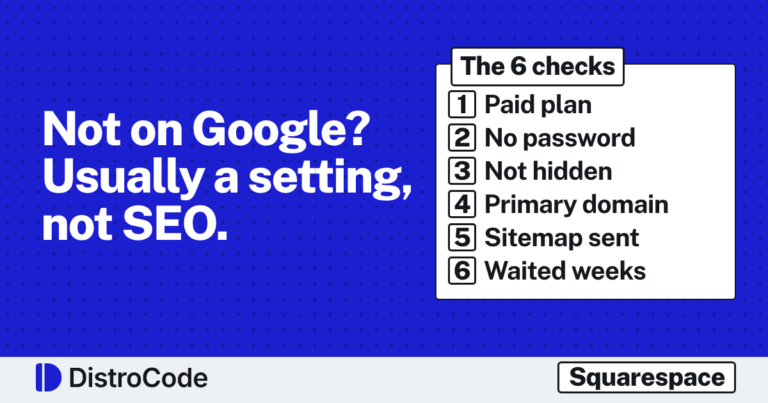
Squarespace has its own settings for this. Here is the Squarespace version of this guide, with its six checks.
Rather hand it over? Send us your Wix address and we will tell you which of the five it is.
Not sure what to ask for? Ask for the free site check: send the site address and we check indexing and AI search visibility, then reply in writing within 2 business days.
Where did these facts come from?
- Wix Help, Enabling search engines like Google to index your site, checked Oct 27, 2026
- Wix Help, Preventing search engines from indexing your site, checked Oct 27, 2026
- Search Console Help, Ask Google to recrawl your URLs, checked Oct 27, 2026
- Google Search Central, AI features and your website, checked Oct 27, 2026
- OpenAI Help, Publishers and developers FAQ, checked Oct 27, 2026
Questions and answers
Why is my Wix website not showing on Google?
The most common cause we check first is the site wide switch. If "Let search engines index your site" is off in SEO Settings, Wix blocks the whole site and that overrides each page. If it is on, check the page switch, then inspect the address in Search Console.
How long does it take for a Wix site to show up on Google?
Wix says crawling takes time and gives no number. Google says a request for indexing "typically takes only a day or so, but can take much longer", and it promises nothing. Check the Page indexing report instead of guessing.
Can I ask Google to index my Wix page?
Yes. Paste the address into URL Inspection in Search Console and click Request indexing. There is a daily limit, and it will not work if the live test says the page cannot be indexed.
Do I need to be indexed to appear in Google AI Overviews?
Yes. Google says a page must be indexed and eligible to show with a snippet, and that no other technical requirement applies. OpenAI says any public site can appear in ChatGPT search, and that you should not block OAI-SearchBot.
Still stuck? Send us the page address and what you see Want to know if the problem stops here? Ask for the free site check.
We write up one real fix or build a few times a week. Follow DistroCode on LinkedIn