WooCommerce Stripe payment not working? What our lab found
In short
When WooCommerce Stripe payment is not working, check the keys first. In our 17 Oct 2026 lab, keys missing, in the wrong mode or in the wrong field made the Stripe plugin hide itself, so buyers saw "There are no payment methods available". A key Stripe did not accept showed "Invalid API Key provided" in the card area.
Seeing this on your own site? Send us the address for a free site check, and a written report comes back within 2 business days.
Key points
- Stripe switched on with no keys, live keys in test mode, or the secret key in the publishable field each made the plugin report Stripe as unavailable. The checkout showed only "There are no payment methods available".
- In live mode on a site without HTTPS the plugin hides Stripe as well.
- A key in the right format that Stripe rejects shows "Invalid API Key provided" where the card form should be, and Place Order fails.
- A webhook with a missing or wrong signature got a 204 from the store, which tells Stripe the delivery went fine while the store ignored it.
- A payment method limited to one currency, such as iDEAL in euros, drops off a store that sells in US dollars.
On this page (10)
- Why is my WooCommerce Stripe payment not working?
- How did we test it?
- What does the buyer see when the Stripe keys are wrong?
- What does “Invalid API Key provided” mean?
- Why do Stripe orders stay pending when payment went through?
- Can the store currency hide a Stripe payment method?
- What did we not reproduce?
- How do you fix Stripe on a WooCommerce store?
- Is Stripe failing on your store right now?
- Questions and answers
Why is my WooCommerce Stripe payment not working?
When WooCommerce Stripe payment is not working, the keys are the first suspect. In our lab, every key mistake we tried made the Stripe plugin quietly drop out of the checkout. The buyer saw no card form and no error about Stripe, only a line saying there were no payment methods.
A store owner tends to look at the settings, see Stripe ticked as enabled, and blame the theme. The plugin has already decided not to show itself.
Payment faults like this one are a large part of our WooCommerce store fixes.
How did we test it?
On 17 Oct 2026, from 4:29 to 4:33 PM ET, we ran a test store on WordPress Playground: WordPress 7.1.3, WooCommerce 11.2.1, PHP 8.3.33 and WooCommerce Stripe Payment Gateway 11.1.1, updated on wordpress.org the day before. It sold one $24.00 PDF guide with Stripe as the only payment method.
We had no Stripe account in the lab and used no real keys. Every key was a made-up string in Stripe’s format. A script set the plugin’s settings, then a headless browser checked out as a guest from Detroit and clicked Place Order.
What does the buyer see when the Stripe keys are wrong?
Nothing about Stripe. We tried four mistakes: Stripe enabled with the key fields empty, live keys pasted into the test fields, the secret key pasted into the publishable key field, and live mode with live keys on a site without HTTPS.
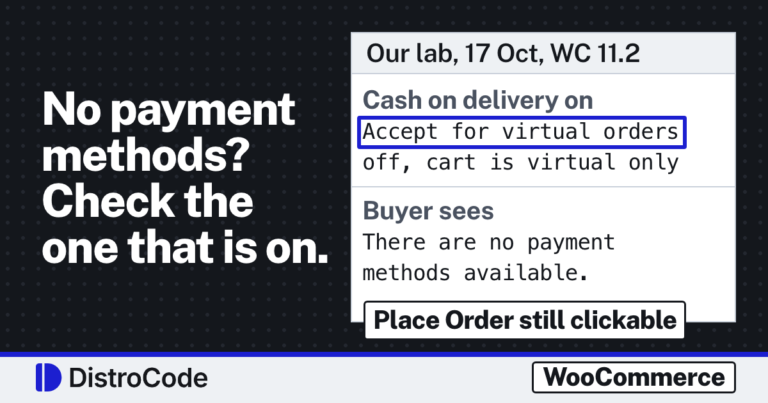
Each time the plugin reported Stripe as unavailable. With the key fields empty we loaded the checkout as a buyer, and the Checkout block showed: “There are no payment methods available. Please contact us for help placing your order.” A store with Stripe installed but never set up showed the same line, and its Place Order button gave “No payment method provided.” with no order made.
The plugin’s code explains it. In test mode it wants a publishable key starting pk_test_ and a secret key starting sk_test_ (or rk_test_ for a restricted key). In live mode it wants pk_live_ and sk_live_, and it also refuses to run without HTTPS. Stripe’s API keys page describes the two pairs.
If your store has no other payment method switched on, this is exactly the screen we wrote up in WooCommerce checkout not working. Stripe being “enabled” does not mean it is on offer.
What does “Invalid API Key provided” mean?
It means the key looked right to the plugin but Stripe did not know it. With a made-up pk_test_ key in place, Stripe appeared under Payment options as “Credit / Debit Card”, marked Test Mode, with a red line where the card fields should be: “Invalid API Key provided: pk_test_**E000″.
While the page sat open, Stripe’s API answered 401 eleven times. Clicking Place Order gave “Invalid or missing payment details. Please ensure the provided payment method is correctly entered.” No order was created.
On a live store this usually means a key from a deleted or rolled key pair, or keys from another Stripe account. Copy both keys again from the same mode of the right account.
Why do Stripe orders stay pending when payment went through?
We could not test that end to end, since it needs a real charge. What we could test is the door the plugin keeps for Stripe’s messages, the webhook address at /?wc-api=wc_stripe.
We sent it six POSTs. Five were wrong in different ways: no secret saved in the store, no signature, a made-up signature, the right signature on a message 10 minutes old, and a signature made with another secret. All five got a 204. Only the message signed with the saved secret got a 200 and was processed.
A 204 is a success code. Stripe’s webhook docs treat any 2xx answer as delivered, so Stripe stops retrying while the store has thrown the event away. The plugin’s code does this on purpose, citing Stripe’s advice to answer with a 2xx, and keeps a 400 for duplicate webhooks only.
The plugin does write down what went wrong. After our runs, the webhook status line in its settings read: “The most recent test webhook … could not be processed. Reason: The webhook was not signed with the expected signing secret.” If paid orders sit at Pending payment, read that line first.
Can the store currency hide a Stripe payment method?
Yes. We switched on card and iDEAL with the store in US dollars. Card stayed available and iDEAL dropped out, since the plugin lists it for euros only. With the store set to euros, both were available.
Card itself took the dollar store without trouble. So if one method such as iDEAL, Bancontact or BLIK vanished after a currency change, this is the likely reason.
What did we not reproduce?
- Real declines, 3D Secure and Radar blocks. They need a live or test Stripe account. Stripe’s declines guide lists the codes and what each one means.
- An order stuck at Pending payment because a webhook never arrived. We tested the webhook check, not a real payment.
- Apple Pay and Google Pay. Stripe.js warned that Google Pay will not appear over HTTP, and our lab had no HTTPS.
- The admin notices on screen. Their text, such as “Stripe is in test mode however your API keys may not be valid”, is quoted from the plugin’s code.
- Caching and minify plugins. WooCommerce’s caching guide says to keep cart, checkout and account pages out of the page cache. We did not run one.
- Refunds, and a real host with HTTPS. Our lab had neither.
How do you fix Stripe on a WooCommerce store?
- Open the checkout logged out, in a private window. Note whether Stripe shows at all, or shows with an error in the card area.
- If it is missing, open WooCommerce, Settings, Payments, Stripe. Check the mode, then check that both keys start with the prefix for that mode and sit in the right fields.
- If it shows “Invalid API Key provided”, copy both keys again from the same mode of the Stripe account the store should use.
- If paid orders sit at Pending payment, read the webhook status line in the same settings screen, and compare the signing secret with the one in Stripe’s dashboard.
- If a method like iDEAL is missing, compare the store currency with the currencies that method accepts.
When we take on a Stripe checkout, we read the mode, the keys and the webhook status first, then place a test order on a copy of the store before touching the live one.
If orders go through but buyers get no receipt, that is a mail fault, traced in WooCommerce not sending order emails.
Is Stripe failing on your store right now?
Send us what the checkout shows and when it started. The text in the card area and the webhook status line usually point to the cause.
Not sure it is Stripe at all? Our free site check looks at the whole store, with a written reply within 2 business days.
Where did these facts come from?
- DistroCode lab, WooCommerce 11.2.1, WooCommerce Stripe Payment Gateway 11.1.1, WordPress 7.1.3, PHP 8.3.33 (17 Oct 2026, 4:29 to 4:33 PM ET), made-up keys in each wrong combination, webhook POSTs with and without signatures, iDEAL on a USD store, checked Oct 17, 2026
- WooCommerce Stripe Payment Gateway source, are_keys_set() and needs_ssl_setup() in abstract-wc-stripe-payment-gateway.php, check_for_webhook() in class-wc-stripe-webhook-handler.php (version 11.1.1), checked Oct 18, 2026
- Stripe docs, API keys (test and live keys, publishable and secret), checked Oct 18, 2026
- Stripe docs, Receive Stripe events in your webhook endpoint (signatures, timestamps, 2xx answers, retries), checked Oct 18, 2026
- Stripe docs, Declines (issuer declines, blocked payments, decline codes), checked Oct 18, 2026
- WooCommerce docs, Configuring caching plugins (exclude cart, checkout and my account pages), checked Oct 18, 2026
Questions and answers
Why is Stripe not showing at WooCommerce checkout?
In our lab with Stripe Payment Gateway 11.1.1, Stripe hid itself whenever its keys did not match the mode. Test mode needs keys starting pk_test_ and sk_test_, live mode needs pk_live_ and sk_live_, and live mode also needs HTTPS. With no other method on, buyers saw "There are no payment methods available".
What does "Invalid API Key provided" mean in WooCommerce Stripe?
Stripe refused the publishable key the store sent. In our lab a made-up key in the right format got that message in the card area and eleven 401 answers from Stripe's API while the page was open. Copy both keys again from the same mode in your Stripe dashboard.
How do I know if Stripe webhooks are failing in WooCommerce?
Open WooCommerce, Settings, Payments, Stripe and read the webhook status line. In our lab it said the last test webhook "could not be processed" and gave the reason. Stripe counts those deliveries as received, because the store answered 204.
Does a Stripe card decline mean the plugin is broken?
No. A decline comes from the card issuer or Stripe's fraud checks, and the plugin only passes the message on. We did not reproduce declines; Stripe's decline codes page lists what each one means.
Still stuck? Send us the page address and what you see Want to know if the problem stops here? Ask for the free site check.
We write up one real fix or build a few times a week on LinkedIn. Follow DistroCode there: linkedin.com/company/distrocode