WordPress headers already sent warning: find the file that started the output
In short
The WordPress "headers already sent" warning means a file printed something before WordPress could send its headers. The file to fix is the one after "output started at", not the one after "in". In our 18 Oct 2026 lab, a closing ?> with a blank line after it and an invisible BOM in wp-config.php each blocked every login.
Seeing this on your own site? Send us the address for a free site check, and a written report comes back within 2 business days.
Key points
- The warning names two files. The one after "output started at" is the culprit. The one after "in" is only where WordPress noticed.
- In our lab a closing ?> followed by a blank line in functions.php, and a BOM in wp-config.php, each caused it.
- The visible damage was the login. The right password gave "Cookies are blocked due to unexpected output" and no session.
- A BOM always reports line 1, and most editors do not show it.
- Deleting the closing ?>, or saving the file as UTF-8 without BOM, brought the login back at once.
On this page (12)
- What does “headers already sent” mean in WordPress?
- Which file is the real problem?
- How did we test it?
- What does the warning break?
- Can a closing ?> cause “headers already sent”?
- Why does the warning say line 1 of wp-config.php?
- How do you find the file when no warning shows?
- Which commands find a stray ?> or a BOM?
- How do you fix “headers already sent” in WordPress?
- What did we not test?
- Is your login refusing the right password right now?
- Questions and answers
What does “headers already sent” mean in WordPress?
The WordPress “headers already sent” warning means some file printed output before WordPress sent its headers. Once a single byte has gone to the browser, PHP will not let WordPress set a header or a cookie, so it prints a warning instead.
The PHP manual says header() “must be called before any actual output is sent, either by normal HTML tags, blank lines in a file, or from PHP.” A blank line is enough.
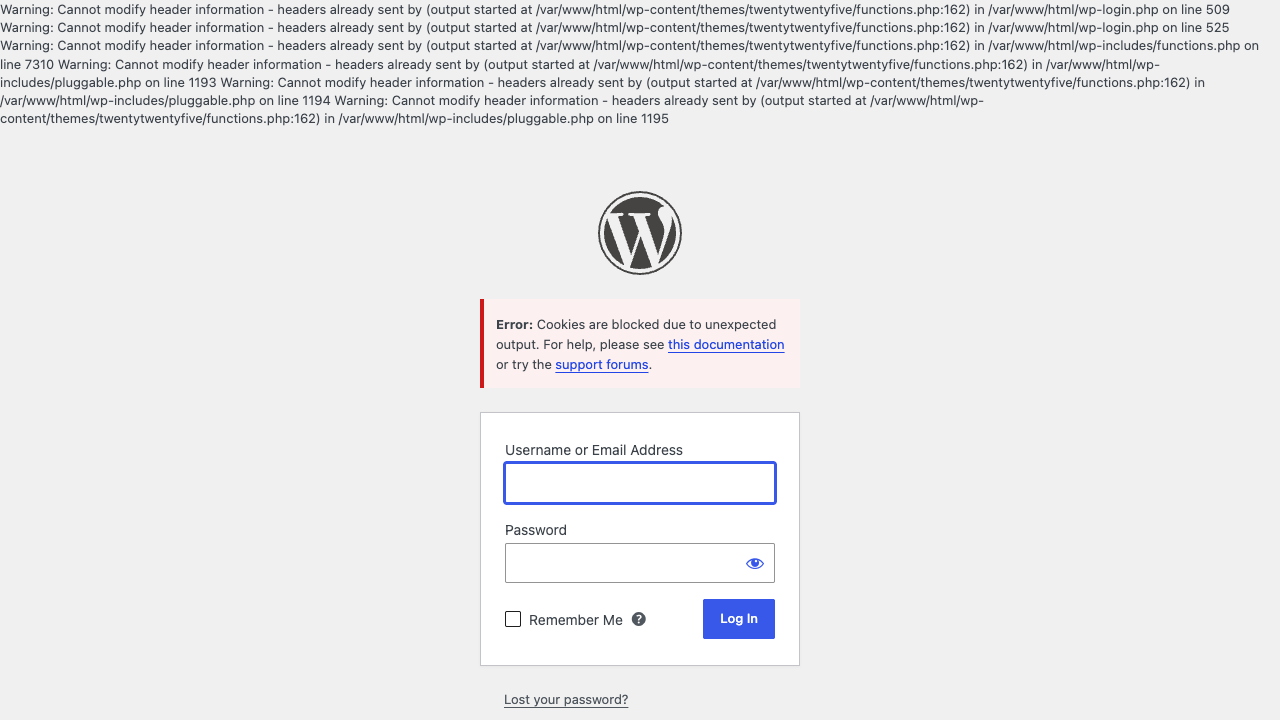
The full warning has this shape, taken word for word from our lab:
Warning: Cannot modify header information - headers already sent by (output started at /var/www/html/wp-content/themes/twentytwentyfive/functions.php:162) in /var/www/html/wp-login.php on line 509Tracing a warning like this to one file, and fixing it on a staging copy first, is one of the one-off jobs in our WordPress maintenance work.
Which file is the real problem?
The file after “output started at”. That is where the stray output came from, and the line number points at it.
The file after “in” is only where WordPress tried to send a header and failed. In our lab it named wp-login.php, pluggable.php and the REST server class, all core files that were fine. Editing those would have changed nothing.
How did we test it?
On 18 Oct 2026 we ran WordPress 7.1.2 on PHP 8.4.26 and Apache, from the official WordPress Docker image, with the Twenty Twenty-Five theme. We broke the site two ways, one at a time, and recorded what the login page, /wp-admin/, the front page, the feed and the REST API returned.
WP_DEBUG and display_errors were on for the captures, so the warnings showed on screen. Further down we cover what you see when they are off, which is the default on many hosts.
What does the warning break?
The login, most of all. With the stray output in place, the login page printed the warnings above the WordPress logo. Entering the right password gave this red box:
“Error: Cookies are blocked due to unexpected output. For help, please see this documentation or try the support forums.”
No login cookie was set, so nobody could get in. It did not loop. The page just refused.
If your login sends you back to the form again and again with no warning, that is a different fault. Our post on the WordPress login redirect loop covers the cookie domain and site address causes.
Opening /wp-admin/ while logged out gave a blank white page holding only two warnings, where it should have sent us to the login form. The front page still looked normal, with two blank lines hidden before the doctype.
The quieter breakage was elsewhere. The RSS feed started with a blank line before its XML declaration, which has to come first, so feed readers can reject it. The REST API printed the warning before its JSON. Background admin requests got a leading blank line, and their warnings went to the log only.
Can a closing ?> cause “headers already sent”?
Yes. It was our first cause. We added a closing ?> and two line breaks to the end of the theme’s functions.php, so the ?> sat on line 161.
PHP swallows the single line break straight after a ?>. The second one is printed as output. That is why the warning said functions.php line 162, the empty line under the ?>, and not 161.
The PHP manual’s own advice is to leave the tag off: “If a file ends with PHP code, it is preferable to omit the PHP closing tag at the end of the file.” It gives this exact reason, stray whitespace after the tag.
The fix was to delete the ?> and the blank lines after it. The next login answered with a redirect to /wp-admin/ and set the login cookie.
Why does the warning say line 1 of wp-config.php?
In our lab that was a byte order mark, or BOM. Some editors save files as “UTF-8 with BOM”, which puts three invisible bytes (EF BB BF) before the opening PHP tag.
We added those three bytes to the start of wp-config.php. The warning changed to “output started at /var/www/html/wp-config.php:1”. The symptoms were the same as before: warnings on the login page, the cookie error and a blank /wp-admin/.
Line 1 is the tell. A BOM is always the first thing in the file, so the warning always points at line 1, and in most editors line 1 looks perfect.
The BOM also landed in front of every page and every admin JSON reply. The browser hid it on the front page. Strict JSON readers in scripts can refuse a reply that starts with it.
How do you find the file when no warning shows?
Turn on the debug log and read it. The PHP image we used ships with display_errors off, and many hosts do the same, so the only thing on screen may be the “Cookies are blocked” box.
In wp-config.php, above the line that says “That’s all, stop editing”, set:
define( 'WP_DEBUG', true );
define( 'WP_DEBUG_LOG', true );
define( 'WP_DEBUG_DISPLAY', false );
Then try to log in once and open wp-content/debug.log. Every warning line carries the same “output started at” file and line.
One trap we hit: our wp-config.php already had a WP_DEBUG line. Adding a second one raised “Constant WP_DEBUG already defined”. Change the existing line instead, and set it back to false when you are done.
Which commands find a stray ?> or a BOM?
These are the checks we ran from the WordPress folder on our lab site. Both flagged the broken file and passed the clean one.
To list PHP files with extra whitespace after a final ?>:
find wp-content -name '*.php' -exec perl -0777 -ne 'print "$ARGV\n" if /\?>(?!\r?\n\z)\s+\z/' {} +A simpler pattern flagged a plugin file that ends in ?> and one normal line break, which is harmless. This one skips that case.
To check one file for a BOM:
head -c3 wp-config.php | od -An -tx1“ef bb bf” means a BOM. A clean file starts “3c 3f 70”, which is “<?p”. Our container had no xxd, so we used od.
To search every PHP file for a BOM:
LC_ALL=C grep -rlP '^\xEF\xBB\xBF' --include='*.php' .Keep LC_ALL=C. In a UTF-8 shell, grep reads \xEF as a character, not a byte, and finds nothing. Keep the --include part too. Without it, our search matched a theme screenshot by chance. This needs GNU grep, as on most Linux hosts: the grep on a Mac has no -P option.
How do you fix “headers already sent” in WordPress?
- Read the “output started at” file and line, from the screen or from wp-content/debug.log.
- Back up that file before you touch it.
- If the line is just after a closing ?> at the end of the file, delete the ?> and any blank lines after it.
- If the line is 1, remove the BOM. Re-save the file as “UTF-8 without BOM”, or run
sed -i '1s/^\xEF\xBB\xBF//'on the file. That form is GNU sed, as on most Linux hosts. On a Mac, usesed -i '' '1s/^\xEF\xBB\xBF//'instead. - Log in again. You should land on the dashboard with no warning above the form.
- Set WP_DEBUG back to false.
After the BOM fix, wp-config.php matched the original byte for byte. After each fix, the login answered with a redirect to /wp-admin/ and set the cookie.
We fix this as a one-off job. On a staging copy we read the log, find the file that printed first, clean it, and log in until the dashboard loads.
What did we not test?
- A login redirect loop. Our lab never produced one; the login refused with the cookie error.
- Nginx, and real shared hosting. We ran Apache in Docker.
- Hosts with PHP output buffering on, which can hide the warning entirely.
- A plugin file as the cause. The mechanics are the same, but we did not run it.
Is your login refusing the right password right now?
Tell us what the warning says after “output started at”, and we will tell you which file to look at.
Want the whole site checked? Send your site address for the free site check, and a written reply comes within 2 business days. If you already know what needs doing, see our one-off WordPress fixes.
Where did these facts come from?
- DistroCode lab, WordPress 7.1.2, PHP 8.4.26 on Apache, theme Twenty Twenty-Five (18 Oct 2026), a closing ?> plus a blank line at the end of functions.php and a UTF-8 BOM at the start of wp-config.php, each found, fixed and re-tested at wp-login.php, checked Oct 18, 2026
- PHP manual, header() ("must be called before any actual output is sent, either by normal HTML tags, blank lines in a file, or from PHP"), checked Oct 18, 2026
- PHP manual, PHP tags ("If a file ends with PHP code, it is preferable to omit the PHP closing tag at the end of the file"), checked Oct 18, 2026
- WordPress Advanced Administration, Debugging in WordPress (WP_DEBUG_LOG writes debug.log in the content directory, WP_DEBUG_DISPLAY false hides errors on screen), checked Oct 18, 2026
Questions and answers
What does "headers already sent" mean in WordPress?
Something printed output, even one blank line, before WordPress sent its headers and cookies. PHP then refuses the header call and prints the warning. The text after "output started at" names the file and line that printed first.
Which file do I fix, the one after "output started at" or the one after "in"?
The one after "output started at". In our lab the "in" part named wp-login.php and pluggable.php, which are core files and were fine. The real problem sat in the theme's functions.php or in wp-config.php.
Why does my WordPress login say "Cookies are blocked due to unexpected output"?
In our lab that message came from the same stray output. WordPress could not set the login cookie, so the right password did not log us in. Removing the extra output fixed it.
Why is the line number 1 when line 1 looks fine?
In our lab that was a UTF-8 byte order mark, three invisible bytes before the opening PHP tag. Most editors hide it. Checking the first three bytes of the file shows it.
Rather hand this to us? See the WordPress maintenance plan Want to know if the problem stops here? Ask for the free site check.
We write up one real fix or build a few times a week. Follow DistroCode on LinkedIn