WordPress contact form not sending email? Test it, then fix how the site sends mail
In short
When a WordPress contact form is not sending email, the form usually works and the sending does not. Out of the box WordPress hands mail to PHP's mail() function as wordpress@ your domain, and Gmail says mail without SPF or DKIM might be marked as spam or rejected. Send yourself a test, then route the site's mail through SMTP.
Seeing this on your own site? Send us the address for a free site check, and a written report comes back within 2 business days.
Key points
- A thank-you message on the page only means the form was submitted. It says nothing about the email.
- WordPress sends through PHP's mail() by default, from wordpress@ plus your domain, unless a plugin changes it.
- Google asks every sender to set up SPF or DKIM. Without them, mail might be marked as spam or rejected.
- In our 15 Oct 2026 lab, wp_mail() returned false with "Could not instantiate mail function." A real host can report success and still lose the message.
On this page (9)
- Why is your WordPress contact form not sending email?
- How does WordPress send a contact form email?
- Why do the messages land in spam or vanish?
- What did our lab test show?
- How do you test your own contact form?
- How do you fix it?
- What did we not test?
- Is your contact form reaching you?
- Questions and answers
Why is your WordPress contact form not sending email?
With a WordPress contact form that is not sending email, the form itself is usually fine. The visitor fills it in, the page says thank you, and the entry is accepted. What fails is the next step, where the site hands the message to the server to send.
That gap is why a broken form can go unnoticed for weeks. Nobody on the site sees an error, and the first sign is a customer asking why you never replied.
Checking that forms still deliver is part of our WordPress care plan, because a form that stops sending costs you the enquiries you never see.
How does WordPress send a contact form email?
Form plugins pass the message to a WordPress function called wp_mail(). In the WordPress source, wp_mail() uses the PHPMailer library and, unless a plugin changes it, tells PHPMailer to use PHP’s own mail() function on your web server.
The sender address matters too. If nothing sets one, the source falls back to wordpress@ followed by your site’s domain. On many sites that address has no mailbox behind it.
Why do the messages land in spam or vanish?
Because the receiving inbox does not trust them. Google’s sender guidelines ask every sender to “set up SPF or DKIM email authentication for your sending domains”. The same page warns that messages without it “might be marked as spam or rejected”.
A message sent by PHP mail() from your web server, under an address nobody set those records up for, can fail that check. The form still says thank you either way.
If the mail arrives but goes to junk, we cover the sender and DNS side in why WordPress emails go to spam.
What did our lab test show?
Our lab check was on 15 Oct 2026: we called wp_mail() on a fresh WordPress 7.1.3 site. It ran in WordPress Playground, with no mail service set up and no form plugin, so we called the function directly, the same way a form plugin does.
It returned false. The error WordPress passed to its wp_mail_failed hook read “Could not instantiate mail function.”
That clean failure is specific to our lab, because Playground has no mail program for PHP to call. On a normal host with no SMTP set up, mail() often reports success, and the message is then filtered or lost further along. A true result is not proof of delivery.
If you run a store, the same cause stops order emails. Our post on WooCommerce not sending order emails shows where WooCommerce records each failed send.
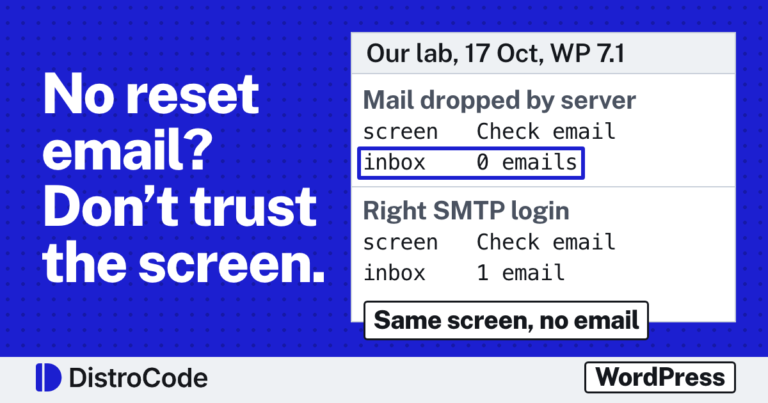
The same cause stops password reset emails, where the login screen can even say the email went out when it did not. Our lab on WordPress password reset emails not arriving shows how to tell the cases apart.
How do you test your own contact form?
It takes about five minutes. Do it once a month and after any plugin or hosting change:
- Fill in your own form, using an email address that is not the site’s.
- Time how long the message takes to reach the inbox it should reach.
- Check the spam folder if it does not show up.
- Reply to it, and make sure the reply arrives where the visitor would expect.
If your form plugin also saves entries in the dashboard, look there as well. An entry saved with no email received means the form works and the sending does not.
How do you fix it?
Stop using PHP mail() and route the site’s mail through an SMTP service or your email provider. Set a From address on your own domain, and check that the domain carries SPF and DKIM records for the service you send through.
Then run the test above again. The message should land in the inbox, not in spam.
This is the fix we do as a one-off job: we trace where the form’s message stops, move the site’s mail onto a proper sending service and check the domain’s records, then send test messages until they land.
What did we not test?
- A form plugin. Our lab called wp_mail() directly, which is what form plugins do, but we did not install one.
- An SMTP plugin or a mail service. We did not compare them.
- A real host. Our false result came from Playground, which has no mail program at all.
Is your contact form reaching you?
Send yourself a message through your own site today. If it does not arrive, or lands in spam, send us the address of the page with the form and we will find where the message stops.
Not sure what is wrong yet? Ask for the free site check by sending the site address, and we reply in writing within 2 business days. If you already know what to fix, the one-off fixes are listed here.
Where did these facts come from?
- Google Workspace Admin Help, Email sender guidelines ("Set up SPF or DKIM email authentication for your sending domains"; unauthenticated messages "might be marked as spam or rejected"), checked Oct 17, 2026
- WordPress source, pluggable.php, wp_mail() (default From wordpress@, PHPMailer isMail(), wp_mail_failed action, returns whether the email was sent), checked Oct 17, 2026
- WordPress Developer Reference, wp_mail(), checked Oct 17, 2026
- DistroCode lab check L1, wp_mail() on WordPress 7.1.3 with no mail service (WordPress Playground, PHP 8.3.33), checked Oct 15, 2026
Questions and answers
Why does my WordPress contact form say thank you but no email arrives?
The thank-you message comes from the form plugin once the entry is accepted. The email is a separate step, handed to WordPress's wp_mail() and then to the server. If the server cannot send, or the receiving inbox rejects the message, the visitor still sees thank you.
What address does WordPress send email from?
Unless a plugin or the form sets one, WordPress uses wordpress@ followed by your site's domain, with any leading www removed. That address often has no mailbox and no SPF or DKIM record behind it.
How do I fix a WordPress contact form that does not send email?
Send the site's mail through an SMTP service or your email provider instead of PHP's mail() function, from an address on your own domain that has SPF and DKIM set up. Then send a test through the form and check that it lands in the inbox, not in spam.
Still stuck? Send us the page address and what you see Want to know if the problem stops here? Ask for the free site check.
We write up one real fix or build a few times a week on LinkedIn. Follow DistroCode there: linkedin.com/company/distrocode