WordPress password reset email not working? Five causes we reproduced
In short
When a WordPress password reset email is not working, the login screen will not tell you why. In our 17 Oct 2026 lab, three causes gave the same "could not be sent" error and two showed "Check your email" while nothing was sent. The screen alone cannot tell them apart, so check what was logged before changing settings.
Seeing this on your own site? Send us the address for a free site check, and a written report comes back within 2 business days.
Key points
- "The email could not be sent" appeared word for word for three causes: no mail program, a wrong SMTP password and a plugin filter that blocks mail.
- "Check your email for the confirmation link" only means PHP handed the message on. In two runs no email existed anywhere.
- With a right SMTP login the reset worked end to end, from the email to "Your password has been reset."
- A reset link works once, and only the newest one works. Core keeps it valid for 24 hours by default.
On this page (13)
- What does it mean when the WordPress password reset email is not working?
- How did we test it?
- Why does WordPress say “The email could not be sent”?
- Why does WordPress say “Check your email” when nothing arrives?
- Can a wrong SMTP password stop reset emails?
- Can a plugin switch off WordPress email?
- Does the From address matter?
- What does a working password reset look like?
- Why does the reset link say invalid or expired?
- How do you fix a WordPress password reset email that is not working?
- What did we not test?
- Is someone locked out of your site right now?
- Questions and answers
What does it mean when the WordPress password reset email is not working?
It means the Lost your password form ran, but no reset link reached the inbox. The hard part is that the screen often says nothing useful, and sometimes says the opposite of what happened.
In our lab, five different setups gave only two screens. Three showed the same error. Two said the email was on its way when no email existed.
Getting people back into a site, and fixing the mail behind it on a staging copy first, is part of our WordPress maintenance work.
How did we test it?
On 17 Oct 2026, from 4:57 to 5:00 PM ET, we ran WordPress 7.1.3 on PHP 8.4.13 with a subscriber account called labreader. A headless browser filled in the Lost your password form at wp-login.php?action=lostpassword and recorded every notice on screen.
The only mail server was Mailpit v1.20.7, a test server that keeps every message and asks for an SMTP login. PHP’s own mail program pointed at a path that did not exist, so nothing could leave the machine. For SMTP we used WP Mail SMTP 4.10.2, the free version.
A small plugin logged what WordPress did behind the screen: whether a reset key was made, and whether the send failed or went through.
Why does WordPress say “The email could not be sent”?
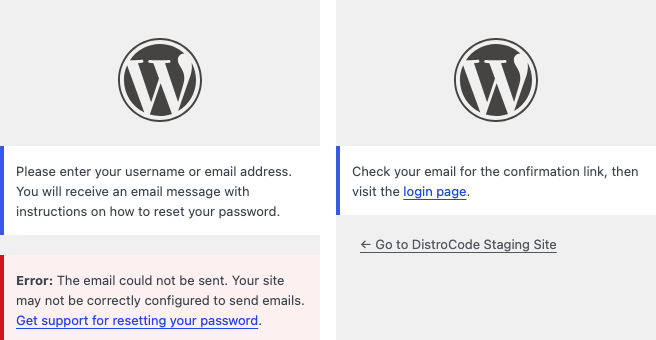
Because the send failed somewhere, and WordPress shows one message for every failure. With no mail program on the server the page read, word for word:
“Error: The email could not be sent. Your site may not be correctly configured to send emails. Get support for resetting your password.”
Behind it, the mail library reported “Could not instantiate mail function.” WordPress still made and stored a reset key for labreader. Our debug log was switched on and held no line from WordPress about the failure.
We then got the same error, word for word, from two other causes: a wrong SMTP password, and a plugin filter that blocks all mail. Both are below. So this message tells you the email failed, not why.
Why does WordPress say “Check your email” when nothing arrives?
That screen means PHP handed the message to something. It does not mean an inbox got it.
We pointed PHP at a mail program that accepts every message and throws it away, the way a server can queue mail it never delivers. The form said “Check your email for the confirmation link, then visit the login page.” WordPress logged the send as a success. No email existed anywhere.
The same screen appeared when a plugin filter told WordPress the mail was sent without sending it. More on that below.
Can a wrong SMTP password stop reset emails?
Yes. With WP Mail SMTP set to our mail server and the wrong password, the user saw the same “could not be sent” error as before.
The traces were better here. WordPress reported “SMTP Error: Could not authenticate.” and Mailpit logged “535 5.7.8 Authentication credentials invalid”. In wp-admin the dashboard showed “WP Mail SMTP: One or more emails recently failed to send. View details”. The plugin’s Debug Events row read “Mailer: Other SMTP / SMTP Error: Could not authenticate.” and pointed at wp-includes/user.php line 3488, the reset function.
With the right password, the next request went through. That run is further down.
If your SMTP plugin keeps an error list, look there before anything else. It was the only place in our lab that named the cause.
Can a plugin switch off WordPress email?
Yes, with one filter. WordPress has had a pre_wp_mail filter since version 5.7, and any value it returns other than null stops wp_mail() from sending. A plugin can use it to stop all mail, on a staging copy for example. We tested the filter itself, not any named plugin.
When the filter returned false, the user saw the familiar “could not be sent” error. Nothing else happened. No failure was logged, WP Mail SMTP recorded no event, and Mailpit got nothing, although SMTP was set up right. The only trace was a new reset key.
When the filter returned true, the user saw “Check your email”. Nothing was sent and nothing was logged anywhere.
The fix is to find the plugin or code adding the filter and turn it off. If the site is a staging copy, that block may be on purpose.
Does the From address matter?
It decides who the email claims to be from, and in our lab it was rarely the account that sent it.
With WP Mail SMTP logged in as labuser@mailhost.test and the From address left alone, the reset email went out From the site’s admin email, lab-admin@example.com. With no SMTP plugin, WordPress used wordpress@ plus the site’s host. On a site whose address was an IP, that became wordpress@127.0.0.1, and nothing stopped it.
Our test server accepts any sender, so we could not show what a real inbox does with a mismatched From. Our post on why WordPress emails go to spam covers the SPF and DKIM side. What we did confirm: forcing the From address in WP Mail SMTP changed the headers on the next email, while the SMTP login stayed the same.
What does a working password reset look like?
With the right SMTP login, the form said “Check your email” and the mail really arrived. The subject was “[DistroCode Staging Site] Password Reset”, from wordpress@lab.test.
The link had this shape: wp-login.php?login=labreader&key= followed by a 20 character key, then &action=rp. Opening it showed “Enter your new password below or generate one.” Saving a new one showed “Your password has been reset. Log in”, and the admin got a “Password Changed” email.
Why does the reset link say invalid or expired?
Opening the same link after the password was reset gave “Error: Your password reset link appears to be invalid. Please request a new link below.” Asking for two resets in a row did the same to the first email’s link. The second link worked.
For the other one, we cut the link’s life to 2 seconds with the password_reset_expiration filter and opened it after 5. The page said “Error: Your password reset link has expired. Please request a new link below.” The default in core is 24 hours.
So open only the newest email, and use it within 24 hours.
How do you fix a WordPress password reset email that is not working?
Find which of the five you have, then fix that one:
- Request a reset for a test user and note which screen you get.
- Open your SMTP plugin’s error list (Debug Events in WP Mail SMTP). Our lab named the cause there and nowhere else.
- No mail program, or a server that drops mail: send through an SMTP service with a real login.
- “Could not authenticate”: correct the SMTP username and password.
- No error logged at all: look for a plugin or snippet using pre_wp_mail.
- Mail arrives from an odd sender: set and force the From address in your SMTP plugin.
- The link says invalid or expired: request a new reset and open only that email.
Then run the full reset again, to the “Your password has been reset” screen.
We fix this as a one-off job. On a staging copy we trace where the reset email stops, set up the site’s mail through a proper SMTP login, and send test resets until one completes.
The same broken sending stops forms too. Our contact form email lab shows how to test that side.
What did we not test?
- Delivery to a real mailbox, spam placement, and SPF, DKIM and DMARC checks.
- Hosts that block SMTP ports.
- Other SMTP plugins, such as FluentSMTP or Post SMTP, and named security plugins.
- Multisite, email link scanners that open the link before you do, and the admin’s “Send password reset” button on the Users screen.
Is someone locked out of your site right now?
Tell us which message the reset form shows and what your mail setup is, and we will say where the email stops.
Want the whole site checked? Send your site address for the free site check, and a written reply comes within 2 business days. If you already know what needs doing, see our one-off WordPress fixes.
Where did these facts come from?
- DistroCode lab, WordPress 7.1.3, PHPMailer 7.1.1, PHP 8.4.13, WP Mail SMTP 4.10.2, Mailpit v1.20.7 (17 Oct 2026, 4:57 to 5:00 PM ET), the Lost your password form with no mail program, a dropping mail program, wrong and right SMTP logins, pre_wp_mail set to false and true, used and expired links, checked Oct 17, 2026
- WordPress developer reference, pre_wp_mail filter (a non-null value short-circuits wp_mail(); introduced in 5.7.0), checked Oct 18, 2026
- WordPress developer reference, password_reset_expiration filter, checked Oct 18, 2026
- WordPress developer reference, retrieve_password() (sends the reset email), checked Oct 18, 2026
- WP Mail SMTP on WordPress.org (version 4.10.2 used in the lab), checked Oct 18, 2026
Questions and answers
Why is my WordPress password reset email not arriving?
In our lab the causes were no working mail program on the server, a wrong SMTP password, and a plugin filter that stopped all mail. The screen looked the same for all three, so check the mail log or your SMTP plugin's error list first.
WordPress says "Check your email" but nothing came. Was it sent?
Not necessarily. In our lab that screen appeared twice when no email was sent at all. It means WordPress handed the message on, not that an inbox received it.
Why does my password reset link say it is invalid?
In our lab that happened when the link had already been used, and when a second reset was requested after it. Each new request replaces the old key, so open only the newest email.
How long does a WordPress password reset link last?
24 hours by default. WordPress sets it with the password_reset_expiration filter, and a plugin can shorten it. Past that time the page says the link has expired.
Rather hand this to us? See the WordPress maintenance plan Want to know if the problem stops here? Ask for the free site check.
We write up one real fix or build a few times a week on LinkedIn. Follow DistroCode there: linkedin.com/company/distrocode