WooCommerce orders stuck on “pending payment”: the timer that cancels them
In short
An unpaid WooCommerce order stays on Pending payment until a timer cancels it. The timer is the Hold stock (minutes) setting, and its sweep runs in WooCommerce's Action Scheduler queue, which WP-Cron starts. In our 18 Oct 2026 lab store, with WP-Cron off and no admin visits, an unpaid order sat pending past its limit.
Seeing this on your own site? Send us the address for a free site check, and a written report comes back within 2 business days.
Key points
- Hold stock (minutes), under Settings, Products, Inventory, decides when an unpaid checkout order is cancelled. Blank switches the timer off.
- The cancel runs as a queued job called woocommerce_cancel_unpaid_orders. With WP-Cron on, our 2 minute order was cancelled at the second sweep, about 4 minutes after checkout.
- With DISABLE_WP_CRON on and no system cron, the order stayed pending past the limit. Three front end visits did not move it. One admin page load did.
- In WooCommerce 11.2.1 "wp cron event run woocommerce_cancel_unpaid_orders" failed with "Invalid cron event". The command that worked was "wp action-scheduler run".
- The stock number did not drop while the order was pending. WooCommerce held the unit as a reservation and released it at expiry.
On this page (10)
- Why are WooCommerce orders stuck on pending payment?
- How did we test it?
- What happens to an unpaid order when the timer works?
- Does a pending order take the stock away?
- What if WP-Cron is switched off?
- Which command cancels the stuck orders?
- How do you fix orders stuck on pending payment for good?
- What did we not test?
- Are unpaid orders piling up in your store?
- Questions and answers
A buyer reaches checkout, presses Place order and never pays. If your WooCommerce orders are stuck on pending payment, the store is waiting for a timer that cancels unpaid orders. When that timer’s job never runs, the orders just sit there.
Why are WooCommerce orders stuck on pending payment?
Because nothing confirmed a payment, and nothing has cancelled the order yet. WooCommerce creates the order the moment the buyer places it, sets it to Pending payment and sends the buyer to pay.
If the buyer closes the payment page, the order stays pending. The Hold stock (minutes) setting decides what happens next. WooCommerce’s docs put it this way: “When your entered limit is reached, the pending order will be canceled and held stock released back to available inventory.”
So a pile of old pending orders means one of three things. The timer is off, the timer’s job is not running, or the buyer did pay and your store was never told. We tested the first two.
Unpaid orders that never clear, and stock that looks wrong because of them, are part of our WooCommerce store fixes.
How did we test it?
Our test store ran on 18 Oct 2026: WooCommerce 11.2.1 on WordPress 7.1.2, PHP 8.4.26 and Apache, inside Docker. Checkout was the classic shortcode page, open to guests. One product, a mug, had stock management on and 5 units.
We set Hold stock to 2 minutes so we would not wait an hour. A small test gateway sent the buyer to an off-site page and never marked the order paid, which is what a buyer who walks away from a payment page looks like to the store. A headless browser placed each order through the real checkout.
What happens to an unpaid order when the timer works?
It gets cancelled, but later than you might expect. Our order 15 was placed at 14:52 UTC (10:52 AM ET). It went to Pending payment with this note:
Stock hold of 2 minutes applied to: <br>- Lab Mug (#10) × 1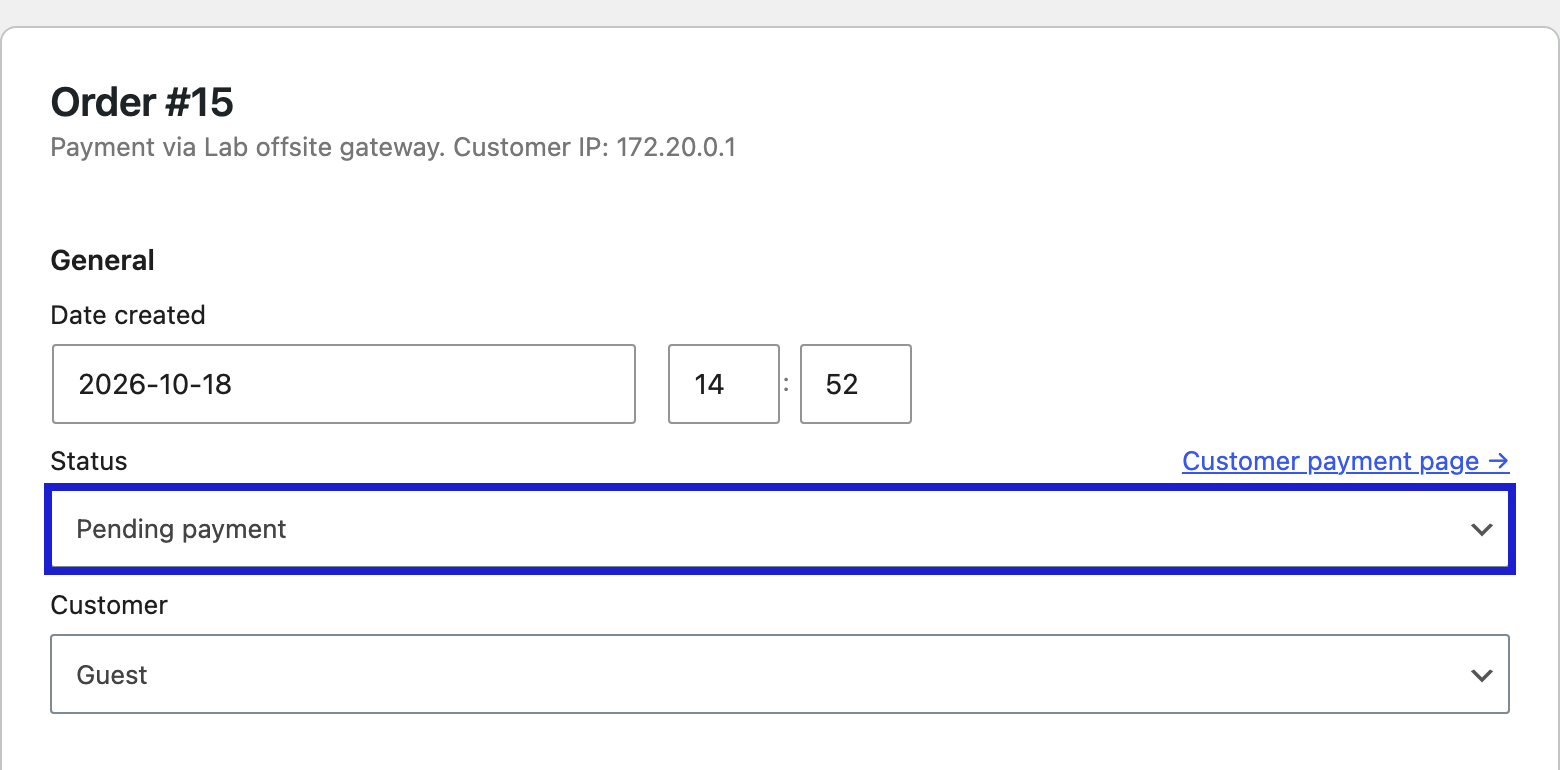
The first sweep ran at 14:54:26 UTC. The order was 1 minute 55 seconds old, under the 2 minute limit, so it stayed pending. The sweep then scheduled itself again, 2 minutes ahead.
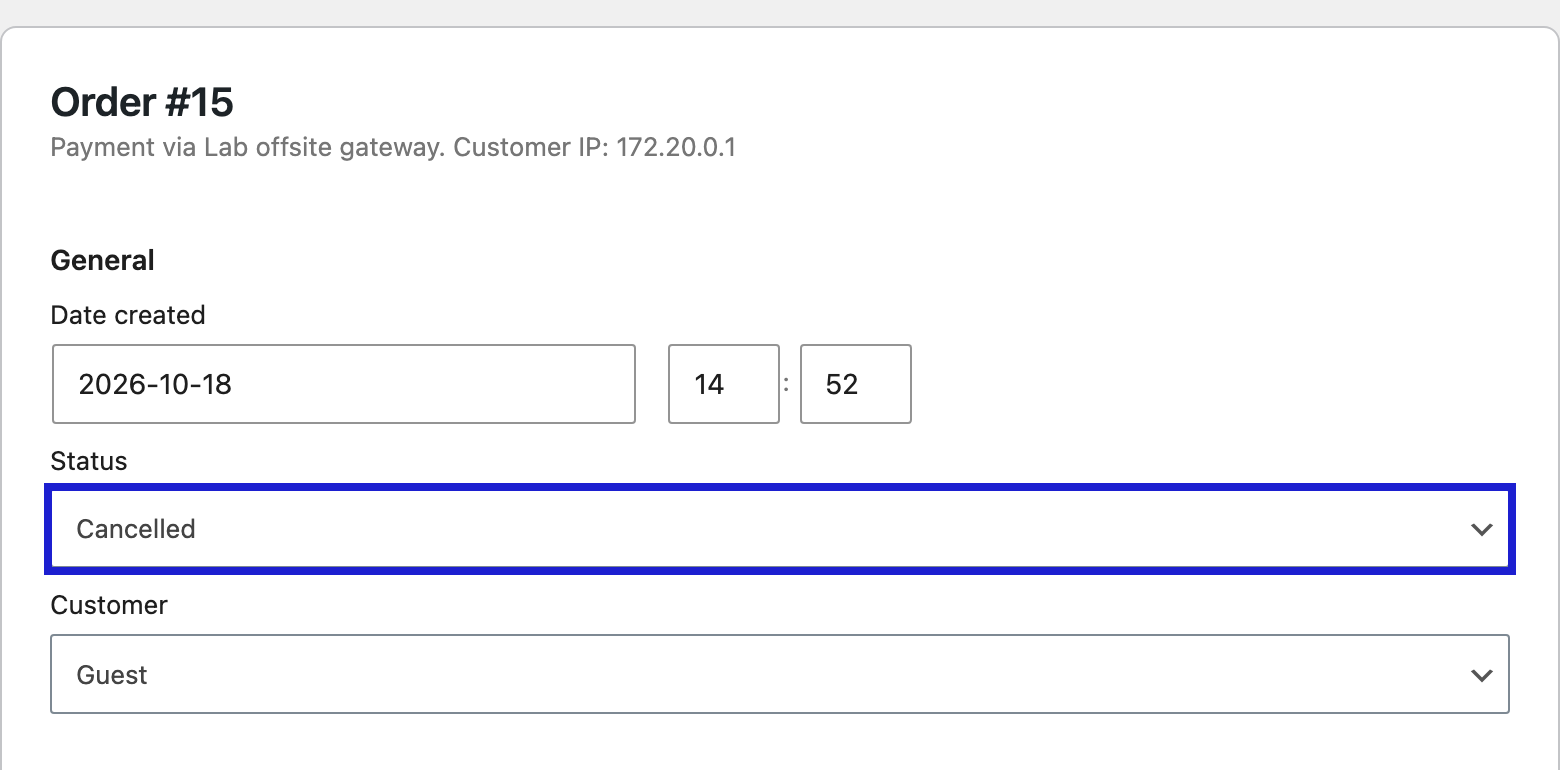
The second sweep, at 14:56:27 UTC, cancelled it. The order notes read:
Unpaid order cancelled - time limit reached.
Order status changed from Pending payment to Cancelled.
That gap is in the code. The sweep runs once per hold period and cancels orders older than the period, so an order can wait up to about two periods. We only ran 2 minutes. On the default of 60, the same rule leaves room for close to two hours.
Does a pending order take the stock away?
Not the stock number. Our product read 5 before, during and after the order. It never went to 4.
What WooCommerce did was hold one unit. It wrote a row to the wp_wc_reserved_stock table for order 15, product 10, quantity 1, expiring at 14:54:31 UTC. While that row was live, other buyers could not take that unit. After expiry the held count went to 0.
So if a product looks in stock in the admin but buyers cannot add the last one, a pending order’s hold is one place to look.
What if WP-Cron is switched off?
The order waits. The sweep is a job in Action Scheduler, the queue WooCommerce uses for background work. Its FAQ says it is started “by WP-Cron (and the ‘shutdown’ hook on admin requests).”
We set DISABLE_WP_CRON to true and placed order 19 at 11:02 AM ET. Its sweep was due at 11:04. At 11:07 nobody had loaded the site and the order was still Pending payment, 3 minutes overdue, with the sweep still sitting in the queue as pending.
Then we sent three plain visitor requests to the front of the store. All three loaded. The order did not move.
An admin page load was different. A second order with the same setup was cancelled within seconds of our script opening it in the admin, because that load started the queue.
On a store where the owner rarely opens the admin, has WP-Cron off and has no server cron, that means unpaid orders sit until someone opens the admin. Why WP-Cron depends on visits at all, and how a missed post looks, is in our test of why WP-Cron only runs when someone visits.
When a store brings us a column of old pending orders, we start with its Scheduled Actions list. Then we find what should start the queue, set a real server cron, and watch one test order get cancelled on time.
Which command cancels the stuck orders?
Not the WP-Cron one. In WooCommerce 11.2.1 this failed:
$ wp cron event run woocommerce_cancel_unpaid_orders
Error: Invalid cron event 'woocommerce_cancel_unpaid_orders'
The sweep is not in the WP-Cron list at all. WooCommerce schedules it through Action Scheduler and uses a WP-Cron event only when Action Scheduler is missing. This worked on order 19 at 11:07:44 AM ET:
$ wp action-scheduler run --hooks=woocommerce_cancel_unpaid_orders
Found 1 scheduled task
Started processing action 39
Completed processing action 39 with hook: woocommerce_cancel_unpaid_orders
1 batch executed.
WP-CLI then printed “Success: 0 scheduled tasks completed.” Ignore that wording. The order was Cancelled, with the same “time limit reached” note, and a new sweep was queued 2 minutes ahead.
How do you fix orders stuck on pending payment for good?
- Open Settings, Products, Inventory and check Hold stock (minutes). If it is blank, the timer is off. The docs say “Leave blank to disable.”
- Open WooCommerce, Status, Scheduled Actions and search for woocommerce_cancel_unpaid_orders. You want one Pending row with a time no more than one hold period ahead, and older rows marked Complete.
- If the Pending row is overdue, check wp-config.php for
DISABLE_WP_CRON. If it is true, something else has to run the queue. - Add a server cron. The WordPress handbook’s way is a scheduled request to wp-cron.php. With WP-CLI on the host,
*/5 * * * * wp cron event run --due-now --path=/path/to/sitedoes the same job. We ran that command in the lab and it started the Action Scheduler queue among 8 due events. We did not install it as a crontab there. - Clear today’s backlog with
wp action-scheduler run --hooks=woocommerce_cancel_unpaid_orders, then check one old order for the “time limit reached” note.
Two limits from the code. The sweep only cancels orders made at the checkout or through the Store API, so an order you created by hand in the admin is never cancelled by it. And the docs say the hold applies to Pending payment only, not On hold.
One more catch from the lab. On a brand-new install the sweep was not in the queue at all until a daily WooCommerce job added it. If step 2 finds no row, that is the problem.
What did we not test?
- The checkout block. We used the classic checkout shortcode.
- Real gateways, and paid orders that stay pending because a webhook never arrived. If your buyer paid, start with the webhook check in why WooCommerce Stripe payments fail.
- The new order tables (HPOS). Our store kept orders in the posts table.
- The default 60 minutes, other WooCommerce versions, Nginx and real shared hosts.
- How soon a new live store schedules its first sweep.
Are unpaid orders piling up in your store?
Tell us how old your oldest pending order is, and we will tell you what is meant to cancel it.
Would a second look at the whole store help? The free site check is a written review of your site, back within 2 business days.
Where did these facts come from?
- DistroCode lab, WooCommerce 11.2.1 on WordPress 7.1.2, PHP 8.4.26 on Apache, theme Twenty Twenty-Five (18 Oct 2026), Hold stock 2 minutes, a test gateway that sends the buyer off site and never marks the order paid, run with WP-Cron on, with DISABLE_WP_CRON true, and from WP-CLI, checked Oct 18, 2026
- WooCommerce docs, Configuring WooCommerce settings, Products, Inventory ("Hold Stock (minutes)", "the pending order will be canceled and held stock released", "Leave blank to disable", Pending payment only, not On hold), checked Oct 18, 2026
- WooCommerce source, wc-order-functions.php (wc_cancel_unpaid_orders, the default of 60 minutes, the reschedule through as_schedule_single_action, checkout and store-api orders only, the "Unpaid order cancelled - time limit reached." note), checked Oct 18, 2026
- Action Scheduler, FAQ ("By default, Action Scheduler is initiated by WP-Cron (and the 'shutdown' hook on admin requests)"), checked Oct 18, 2026
- Action Scheduler, WP-CLI (action-scheduler run and its --hooks option), checked Oct 18, 2026
- WordPress Plugin Handbook, Hooking WP-Cron Into the System Task Scheduler (a system task that requests wp-cron.php, then DISABLE_WP_CRON in wp-config.php), checked Oct 18, 2026
Questions and answers
Why does WooCommerce leave orders on pending payment?
Pending payment means the order was created and no payment was confirmed. The buyer may have left the payment page, or the gateway never reported back. WooCommerce keeps the order until it is paid or the Hold stock timer cancels it.
How long does WooCommerce wait before it cancels an unpaid order?
As long as Hold stock (minutes) says, and the default in the code is 60. The sweep runs once per that period and cancels orders older than it, so in our 2 minute lab one order waited for the second sweep, about 4 minutes in all.
Why are some pending orders never cancelled?
Per the WooCommerce code, the sweep only cancels orders created at the checkout or through the Store API. An order you add by hand in the admin is left alone. A blank Hold stock field also stops the sweep, and so does a queue that never runs.
Does a pending order reduce stock in WooCommerce?
Not in our lab. The product stock stayed at 5 the whole time. WooCommerce put a one unit reservation in the wp_wc_reserved_stock table and dropped it when the hold ran out.
The buyer paid, so why is the order still pending?
That is a different fault. The payment provider has to tell your store the payment went through, usually by webhook. The timer here only cancels orders nobody paid for. We cover the Stripe webhook check in a separate post.
Still stuck? Send us the page address and what you see Want to know if the problem stops here? Ask for the free site check.
We write up one real fix or build a few times a week. Follow DistroCode on LinkedIn