

Monthly WordPress maintenance and support
Monthly WordPress maintenance costs $99 a month, or $229 for a WooCommerce store. Both plans cover the same five things: weekly updates tested on a staging copy first, a daily backup, an uptime watch, a security scan and a written note each month. Both run month to month. One-off fixes are $45, $110 or $250.
Every job starts from a backup or a staging copy, and we tell you the cause in plain words before we change anything.
Site down now: $45 fix After a fix: $99 a month (WordPress) or $229 (WooCommerce)
We are DistroCode, a web studio and a US company, with over 300 projects delivered since 2017. We write our own WordPress plugins under the name PluginSprout, and the quote calculator we built on WordPress for a same-day courier is on our Work page.
What does a month of care include?
Five things. Updates once a week, on a weekday, tested on a copy first. A daily backup. An uptime watch. A security scan. A short written note at the end of the month.
The plan runs month to month, and you can cancel any time.
A common story in the help requests we read: an update ran, and the site broke. Monthly care is there to catch that on a copy, before your visitors see it.
Updates tested on a copy before the live site
Once a week, on a weekday, we run WordPress, theme and plugin updates on a staging copy of your site first. A staging copy is a private clone that visitors never see.
Then we click through the pages that bring in money or leads. That means the home page and your contact form, and for a store, the cart and the checkout.
We work from a written list: the 7 checks we run before an update. In our 13 Oct 2026 lab, three of them caught a real fault: loading the home page logged out, saving a post and placing a guest order.
If something breaks on the copy, that update does not go to the live site. We hold it back and tell you which plugin, which version, and what broke.
When the copy looks right, we run the same updates on the live site and check the same pages again.
Some updates have to wait on someone else. If a plugin’s author has not caught up with a new WordPress or PHP version, we hold that one plugin back and say why. Everything else still gets updated.
PHP 8.2 gets security fixes only until 31 Dec 2026 (PHP.net, supported versions, checked 24 Oct 2026). You can check which PHP version your site runs under Tools, Site Health, Info, Server.
Backups you can restore from
Every day we take a full backup of the files and the database.
We keep each daily backup for 30 days, stored outside your hosting account. If the hosting account has a problem, the backups are not caught in it.
Keep your host’s own backups switched on as well, under your own login. One owner asked the DigitalOcean Community forum for help after their developer disappeared when the site was about 90% done. Backups in your own account stay yours, whatever happens with any developer, us included.
If an update gets past the copy and still breaks the live site, we undo that update first, and restore a backup only if that fails. On a store, we check for orders placed since the backup before restoring it. Then we look for the cause on the staging copy.
An uptime watch and a security scan
The uptime watch checks that your site is answering. If the site stops answering, the watch alerts us.
The security scan checks the site for malware. If it finds something, we tell you what it found and where.
Neither one keeps the site up or cleans it. Cleaning up a hacked site is a separate job, quoted after we see the site. If your site is hacked, read what to do in the first hour after a hack before anyone deletes a file.
A written note each month on what changed
At the end of each month you get a short note in plain words. It covers five things:
- what we updated, with the old and new version numbers
- what we held back, and why
- the date of the last backup
- anything that needs a decision from you, such as a plugin its author no longer updates
- how long the work took that month
You do not need to read code to follow it. In a recent r/Wordpress post, someone wrote that they were “not a web person” and now in charge of the company site “after the agency that built it left”. The monthly notes are there so whoever comes next starts with a written record of the site.
Are WordPress updates and auto-updates safe?
Most updates run without trouble. The risk is the one that does not, and an automatic update runs it on the live site with nobody checking the pages after.
Two recent posts on the WordPress.org support forum carried the titles “Upgrade to 7.1.2 Causing Editor Issues” and “WordPress 7.1.2 causing pages to display wrong content with Divi”. One update, two broken sites.
On the care plan, that update meets a staging copy first, and an update that breaks the copy never reaches the live site.
What our own test sites showed on 13 Oct 2026
On a WordPress 7.1.3 test site set to a 128 MB memory limit, a plugin that needed 150 MB took the front page to a 500 error. Logged in, wp-admin still loaded with a 200 and looked healthy.
So a dashboard that loads is not proof the site works. After each update on the copy, we click through the home page and the contact form, and on a store the cart and the checkout.
The same day, a scheduled auto-update took the Classic Editor plugin from 1.6.7 to 1.7.0 in 10 seconds. The only email went to the site’s admin address. What WordPress records about who switched auto-updates on is in who turned on WordPress plugin auto-updates.
Every fault from those runs is sorted by what you see on screen in what to do when a WordPress site is broken after an update.
Do you need a WordPress maintenance plan, or one fix?
If something is broken today, start with a one-off fix. You do not need a monthly plan for it. If the site works and you want the updates run and tested every week, take the plan.
One $45 fix covers one problem, done in 2 days. The $99 plan covers the same five things every month, whether or not anything breaks.
Not sure which you need? Ask for the free site check first. We test your site and send a written report, and you decide what to fix.
What happens if an update breaks the site, and how fast is it back?
If an update breaks the staging copy, it stays off the live site, and we tell you which plugin, which version and what broke. If one gets past the copy, we undo that one update first and restore a backup only if that fails.
Undoing one update keeps every other change made since the last backup. On a store, we check for orders placed since the backup before restoring it.
The uptime watch alerts us when the site stops answering. Do not wait for WordPress to tell you: in our 11 Oct 2026 test, a crash on the home page alone sent no email. The “technical issue” email went out only once the same error reached /wp-admin/.
We reply within one working day, Monday to Friday. We do not put a number of hours on the restore before we have seen the site, because it depends on what broke and on your host. If your host is slow to restore a backup, we tell you when that happens.
Something broke today? One-off fixes
Tell us what you see and the page it happens on. A screenshot of the error helps more than a long description.
You do not need a monthly plan for a one-off fix. We take a backup or a staging copy before we touch anything, find the cause, and tell you what we will change before we change it.
These are three problems owners post about. Payment trouble is one of them: an owner on r/Wordpress wrote that their Square plugin kept disconnecting, and that it had become a problem for the business.
Not sure what to ask for? Ask for the free site check first. We test your site and send a written report, and you decide what to fix.
One-off fixes are $45, $110 or $250, by how many problems you need fixed.
Critical error or white screen after an update
“There has been a critical error on this website.” That line, or a blank white page (often called the WordPress white screen of death), means PHP hit an error it could not get past. PHP is the code WordPress runs on.
On 17 Oct 2026 we made a WordPress 7.1.3 lab show both screens, with a test plugin that called a function PHP 8 removed. The posts explain what the critical error message means and why the page goes blank.
The usual trigger is a plugin or theme update. A PHP version change at your host can do it too: one recent r/Wordpress thread was titled “contact form 7 (v6.2) crashing sites running php8.2”.
How do you fix a WordPress critical error? Find the exact cause before changing anything. The server’s error log names the file and the line that failed, and that file belongs to a plugin, a theme or WordPress itself.
From there the fix is to roll that one plugin back, update it, or replace it. We try it on a copy first.
What we will not do is switch plugins off one by one on your live site until the error goes away. That hides the cause, and it can quietly break a form or a checkout along the way.
Some faults need a pair of plugins switched on at once. In our 17 Oct 2026 test, turning off half the plugins found nothing, because each half held one of the pair. The test order that finds both is in how to find the plugin pair behind a WordPress plugin conflict.
A different message reads “Briefly unavailable for scheduled maintenance. Check back in a minute.” That is WordPress telling visitors an update is running. It uses a file named .maintenance in the site’s main folder, and it ignores that file after 10 minutes (WordPress 7.1.2, wp-includes/load.php, lines 417 to 447, checked October 9, 2026).
So if the site came back half working after that message, an update probably stopped partway. The plugin it was updating needs checking.
WooCommerce checkout not working
A shopper who hits a checkout fault can simply leave without a word, so the store owner may be the last to hear about it.
This is the fix we can show you start to finish, because we did it on our own test store. We broke our own store on purpose to test the fix.
On the DistroCode Staging Store (WordPress 7.1.2, WooCommerce 11.2.0), we switched every payment method off. A canvas tote bag sat in the cart at $24.00.
The checkout said: “There are no payment methods available. Please contact us for help placing your order.” The Place Order button still showed underneath, as if nothing were wrong.
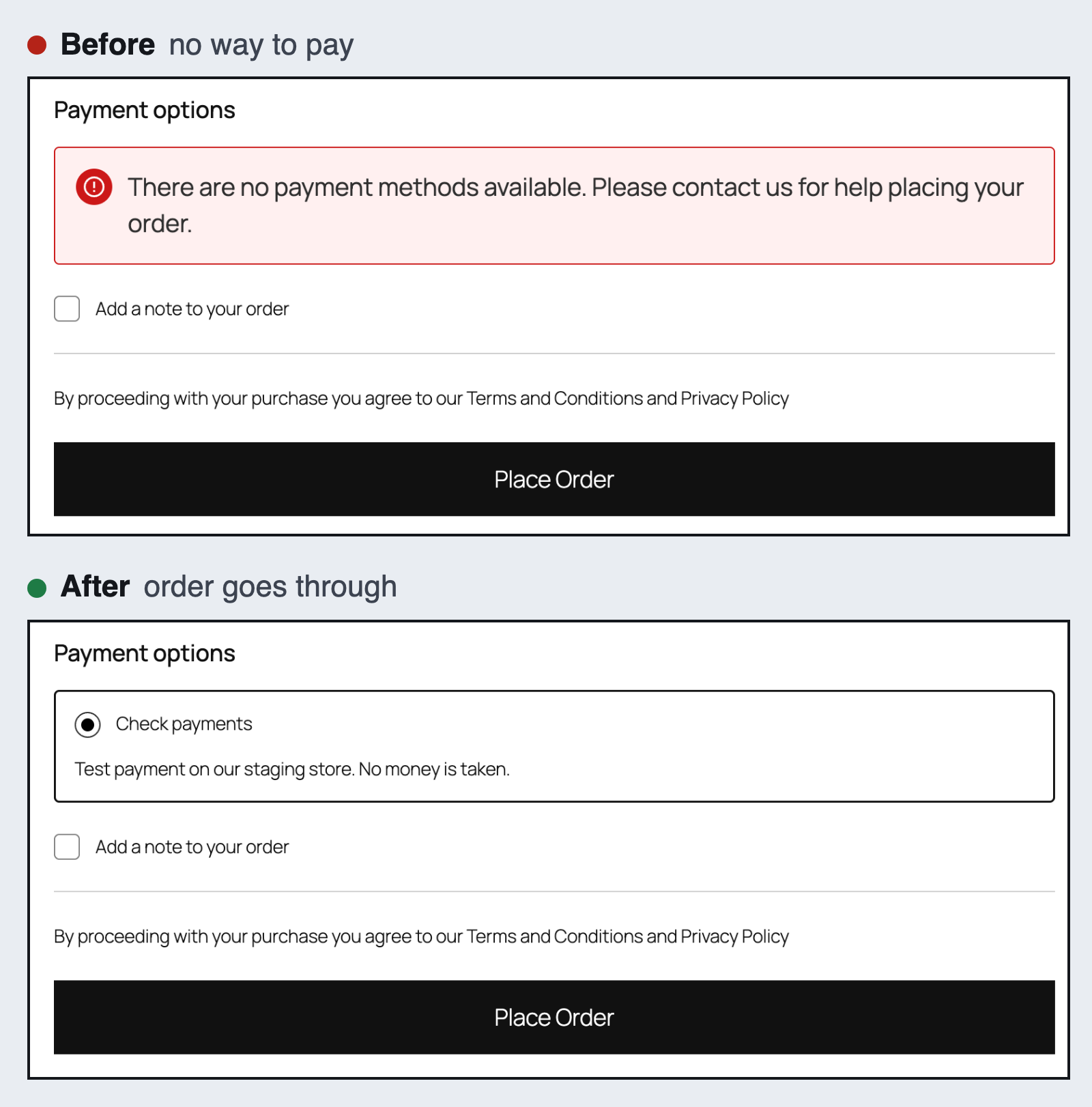
The fix was in WooCommerce, Settings, Payments. We turned Check payments back on, with a line for shoppers saying no money is taken on the test store. Check payments appeared at the checkout, and test order #13 went through for $24.00 on October 9, 2026.
On a real store the same message can have other causes. We find which one it is before we change a single setting.
Owners also post about order emails that stopped arriving, or a payment plugin that fails on some orders. We test those with test orders on a copy, never with your customers’ cards.
When order emails do arrive but land in spam, check the From address and your domain’s SPF and DKIM records first. Our labs on that are in why WordPress emails go to spam.
We write WooCommerce code ourselves, too. PluginSprout is our own line of WordPress plugins, and two of them are for WooCommerce stores: WC Order Search Pro and Failed & Spam Order Cleaner for WooCommerce.
Slow pages
Why is my WordPress site so slow? The posts we read from site owners, plus one job board listing, show how different the answer can be. One Elementor site was simply slow. One returned a random “too many requests” error. Another timed out. A freelance job post said “every page drags”, with caching and minification plugins already switched on and GTmetrix and PageSpeed Insights still warning about slow pages.
So we do not add another speed plugin and hope. We check, in this order: image sizes, the scripts each plugin loads on the page, the theme or page builder, and the hosting plan.
If you want to speed up a WordPress website, send us the slowest page first.
We start with a measurement, not a promise. We test that page and write down the tool, the date and the numbers.
After the changes, we run the same test on the same page and send you both results. You also get a note on which change made the difference.
We have no before-and-after speed test of our own to show on this page yet. Until we do, we will not quote a speed score we have not measured on your site.
One cause we did reproduce sits in the database. On 17 Oct 2026, 3 MB of autoloaded options on a WordPress 7.1.3 test site turned Site Health’s check to “Autoloaded options could affect performance”. The check and the fix are in what to fix first on a slow WordPress site.
How do we work on a live site?
In four steps. Here is each one, with what it looked like on our own test store.
- Backup or copy first. Before any change we take a full backup or work on a staging copy, and for a live store we recommend staging. The test store needed no backup: it was a WordPress Playground copy (WordPress 7.1.2, PHP 8.3) built from a script, so we could rebuild the broken checkout from scratch at any time.
- Cause before change. We find the root cause and tell you what we plan to change. On the test store the cause was three payment methods switched off: Direct bank transfer, Check payments and Cash on delivery.
- Change, then check. We change one thing and test it the way a customer would. We did not trust the settings screen; we placed test order #13 and watched it reach “Order received”.
- A written note. For the test store the note would say: no payment method was enabled; Check payments is now on, with a description saying no money is taken; switch it off before taking real orders.
The quote gives you a date, once we have seen the site. If your host is slow to restore a backup, the date moves, and we tell you when that happens.
Can we host the site as well as look after it?
Yes. We host WordPress sites and manage the server ourselves, so the updates, the daily backups and the hosting sit with one team. When the uptime watch alerts us, there is no host support line in between.
Hosting is priced with your care plan or on its own.
What will we not promise?
A short list, so nobody is surprised later.
And if the budget only covers a guess, we are the wrong fit. We will not change things before we know the cause.
- Uptime. No one can promise a site never goes down, and we do not. The uptime watch tells us when it does; it cannot stop it. We reply within one working day, Monday to Friday, so an alert that comes in at night or over a weekend is already waiting when our next working day starts.
- A PageSpeed score. We measure before and after and show you both, with no guaranteed number.
- Search rankings. Maintenance and fixes keep the site working. They do not come with an SEO result.
- Malware or hacked site cleanup in the plan price. The security scan looks for it and we tell you what it found and where. Cleaning up a hacked WordPress site is a separate job, quoted after we see the site.
- A redesign or a rebuild. This service keeps the site you have running. It does not replace it.
- Sites that do not run on WordPress.
Which WordPress problems have we written up?
Sorted by what you see on screen. Each post gives the steps, the sources and the date we checked them.
Is your site showing an error screen?
Is email from your site not arriving?
Are you locked out or blocked?
Did an update or a plugin break something?
Is the site slow, hacked or missing from Google?
- Site slow: what to fix first
- LCP poor on mobile
- Why one upload becomes 11 files
- How many revisions WordPress keeps
- Missed schedules and WP-Cron
- Site Health critical issues
- Mixed content after moving to HTTPS
- 404s after a permalink change
- Hacked: the first hour
- Redirecting to spam
- Discourage search engines from indexing
- Privacy policy page still a draft
Questions owners ask
How much is monthly WordPress maintenance?
It is $99 a month for a WordPress site, or $229 a month for a WooCommerce store. The store plan adds a test order on the checkout after every update.
We set four other firms’ published plans beside ours in how much WordPress maintenance costs a month, read on 18 Oct 2026.
What does monthly WordPress care include?
Five things: weekly updates tested on a staging copy first, a daily backup kept for 30 days outside your hosting account, an uptime watch, a security scan and a written note each month. The store plan adds a test order on the checkout after every update.
Do I need a WordPress maintenance plan?
Not for a single fault. You do not need a monthly plan for a one-off fix at $45, $110 or $250. The plan fits a site that works today, when you want the updates run and tested every week, for $99 a month or $229 for a store.
Are WordPress auto-updates safe?
Most run fine, but an automatic update runs on the live site with nobody checking the pages after. In our 13 Oct 2026 test, an auto-update changed a plugin version in 10 seconds and emailed only the admin address. On the care plan, updates run on a staging copy first.
What happens if an update breaks my site?
If it breaks the staging copy, it never reaches the live site, and we tell you which plugin, which version and what broke. If one gets past the copy, we undo that update first and restore a backup only if that fails. We reply within one working day, Monday to Friday.
How much does it cost to fix a WordPress site?
One fix is $45 for a single problem, such as a white screen or a broken form, done in 2 days. Fix and speed is $110 for up to 3 problems plus your slowest page sped up, in 3 days. Fix, speed and checkout test is $250 for up to 5 problems, 3 pages sped up and a full checkout test, in 5 days. We agree the scope in writing before we start, so the price does not move halfway through.
Do you work on the live site?
Only after a backup. For a live store we work on a staging copy first, so customers never see a half-finished fix. We change the live site once you have read what we found and said yes.
Can you fix a WooCommerce checkout that stopped taking payments?
Yes. We reproduce the fault on a copy, find which gateway, plugin or setting caused it, and place a test order before and after the fix so you can see the checkout work again.
What if you cannot fix it?
If a problem looks outside what we can fix, we say so before we start.
If we start and cannot fix it, you still get the written note: what we found, what we tried, and where the cause seems to sit.
If we cannot fix it, you do not pay for that job.
How long does maintenance take each month?
It depends on the site. A brochure site needs less checking than a store, because a store’s checkout has to be tested after every update.
We would rather not guess before we have seen it. After the first month, the note tells you how long the work took.
Do you host the site?
Yes, if you want us to. We host WordPress sites and manage the hosting ourselves, priced with your care plan or on its own. Ask about hosting.
If you would rather stay with your current host, that works too. We look after the site where it is, and if the host is part of the problem, for example a plan too small for your traffic, we say so and tell you exactly what to ask them for.
Moving to a new host is a separate job, covered on our website migration page.
Do you need my admin login?
Yes: admin access to WordPress, or to a staging copy. A separate admin user for us is better than sharing your own password, and you can delete it when the work is done.
For a store, we recommend a staging copy. If a backup ever has to be restored, we may also ask for your hosting login.
Which countries do you work with?
Clients in the United States, Canada, Australia and New Zealand. We work in writing by email, so time zones do not slow the job down, and we reply within one working day.
How do I reach you?
By email at support@distrocode.com or through the contact form. We reply in writing within one working day, Monday to Friday, so you keep a record of what was said.
Is something broken right now?
Tell us what happened, the page it happens on, and who hosts the site. Contact us or email support@distrocode.com, and we will reply with next steps.
Not sure what to ask for? Ask for the free site check first. We test your site and send a written report, and you decide what to fix.